


No products in the cart.

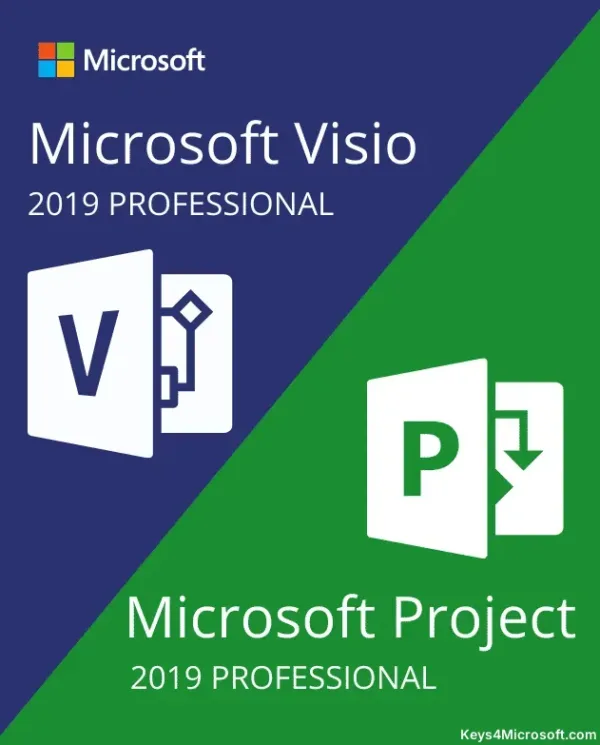
Project Professional + Visio Professional 2019 Bundle — Two Genuine Microsoft License Keys in One Purchase
Project Professional + Visio Professional 2019 Bundle is a lifetime license key bundle for running Microsoft Project Professional 2019 and Visio Professional 2019 on the same PC, delivered by email. Both product keys are genuine, work independently of each other, and activate directly against Microsoft’s own servers — nothing here is a trial, a crack, or a subscription that lapses. It’s built for project managers, business analysts, and IT teams who plan schedules in Project and document processes, org charts, or network diagrams in Visio, and would rather buy both at once than track down two separate listings.
Buying the pair together costs less than buying Project Professional 2019 and Visio Professional 2019 separately, and you still get two independent license keys — each installs and activates on its own, so you’re not locked into putting both apps on the same machine if your team splits the tools across different PCs.
- License TypeGenuine License Key
- ActivationOnline Activation
- PlatformWindows 7 or newer, 32 & 64-bit
- DeliveryEmail, within minutes
Project Professional 2019 keeps the classic Project ribbon interface, with Gantt charts, resource sheets, and timeline views alongside newer additions like the roadmap-style Timeline bar. Visio Professional 2019 uses the same Office-style ribbon, so anyone who already knows Word or Excel finds the shape stencils and diagram templates familiar within minutes.
Both apps are aimed at the same kind of buyer: someone tracking real projects with real deadlines and real deliverables. Project keeps schedules, budgets, and resource assignments in one file your whole team can see; Visio turns that same project data — or any other business process — into diagrams stakeholders can actually read in a meeting.
What Is Included in Project Professional + Visio Professional 2019 Bundle
Both full desktop applications, each with everything the Professional edition includes.
Full Project Scheduling & Gantt Charts
Project Professional 2019 builds schedules with Gantt charts, resource sheets, and the Timeline view, laying out tasks, dependencies, and deadlines in one file. Use it when a project has more moving parts than a spreadsheet can track cleanly.
Resource & Team Management
Assign people, equipment, and budget to tasks, then let Project flag over-allocated resources before they become a bottleneck. Built for managers juggling more than one project across the same team.
Real-Time Co-Authoring
Project and Visio files can be shared and edited by more than one person at a time, with changes syncing so nobody overwrites someone else’s work. Useful when a schedule or diagram needs input from more than one department before it’s final.
Extensive Visio Template Library
Visio Professional 2019 ships with an expanded set of shapes, stencils, and templates beyond the Standard edition, covering flowcharts, floor plans, network diagrams, and org charts. Start from a template instead of a blank canvas when you need something presentable fast.
Data-Linked Diagrams
Connect Visio shapes directly to data in Excel, Active Directory, SharePoint, or SQL Server so a diagram updates when the underlying data changes. Matters for network maps or org charts that would otherwise go stale the week after you draw them.
Information Rights Management
Turn on Information Rights Management (IRM) on a Visio diagram to control who can open, edit, or print it. Use it for diagrams that show internal infrastructure or business data you don’t want circulating outside your team.
Standardized Process Documentation
Visio Professional 2019 supports standard process notations — BPMN 2.0, UML 2.4, IEEE, and Windows Workflow 4.0 — so process diagrams follow a format other tools and auditors already recognize. Helpful when documentation needs to hold up outside your own team.
Automatic Data-Driven Org Charts
Point Visio’s org chart wizard at an existing data source and it builds the chart for you instead of you dragging boxes by hand. When the data changes, regenerate the chart instead of redrawing it.
Project Professional + Visio Professional 2019 — What You Actually Get With Each App
A closer look at what Project and Visio each bring to the bundle.
Diagram Complex Systems Without Starting From Scratch
Visio Professional 2019 covers business diagrams, IT architecture, network maps, technical schematics, and floor plans out of the box, all through built-in templates. That range is the difference between the Standard and Professional editions — Standard covers general-purpose diagramming, Professional adds the templates IT and engineering teams actually need.
If you only need the diagramming half of this bundle, MCAKey also sells Visio 2019 Professional on its own — useful to know if your team splits Project and Visio across different machines.
Real Schedules, Not Just Task Lists
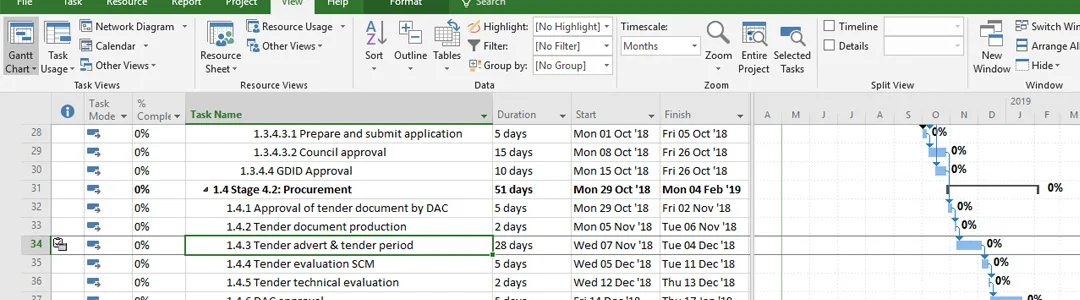
Project Professional 2019 tracks dependencies between tasks, so moving one deadline shows exactly what else shifts down the line — not just a flat list of due dates. Resource views show who’s overloaded before you assign them a fourth task that week.
The Timeline view turns a detailed schedule into a simple bar you can drop into a status update or a slide deck, without rebuilding the whole plan in another tool.
Business Process Diagrams That Match How Your Org Actually Works
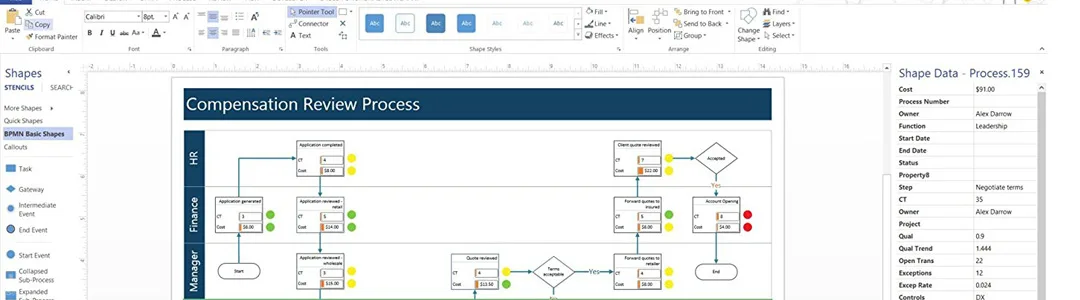
Visio Professional 2019 includes more than 20 process templates — BPMN, SharePoint workflow, workflow mapping, EPC — so you’re documenting a process in a format your team, and often outside auditors, already recognize.
Validation rules let you set review checkpoints on a process diagram itself, useful when a workflow needs sign-off from more than one person before it’s considered final.
Plan Multiple Projects Without Losing Track of Any of Them
Project Professional 2019 is built for managing more than one active project at a time, with resource sheets that show the same person’s workload across every project they’re assigned to — not just the one file you have open.
If you’d rather run Project 2019 Professional Plus on its own, MCAKey sells it separately too — the bundle just saves you from buying both licenses at full price.
Project Professional + Visio Professional 2019 Bundle
What is included with your purchase.
Genuine License Keys by Email
You get two separate product keys — one for Project Professional 2019, one for Visio Professional 2019 — sent to your email within minutes of payment. No physical media, no waiting on a disc.
Lifetime License — Pay Once
Both keys are perpetual licenses. Activate once and the software is yours to keep, with no subscription fee and no renewal date to track.
Online Activation in Minutes
Both Project and Visio activate online directly against Microsoft’s own activation servers. Enter the key in the app and you’re done — no phone call required.
Full Update Access
Once activated, both apps are entitled to the security patches and feature updates Microsoft releases for the 2019 versions, installed the same way as any other Office application update.
32 & 64-bit, Windows 7 and Newer
Both Project Professional 2019 and Visio Professional 2019 install on 32-bit or 64-bit Windows 7 or newer, including Windows 10 and 11. Windows XP and Vista aren’t supported.
Activation Support Included
If a key doesn’t activate cleanly, our support team is available over live chat, WhatsApp, and email to walk through it with you.
Runs on Windows 7, 8, 8.1, 10, or 11, in both 32-bit and 64-bit editions. Windows XP and Vista are not supported.
Project Professional + Visio Professional 2019 Bundle — Common Questions
What buyers usually ask before ordering this bundle.
Is this a lifetime license or a subscription?
It’s a lifetime license for both apps. You activate Project Professional 2019 and Visio Professional 2019 once each, and there’s no recurring fee or expiration date.
What happens if one of the keys doesn’t activate?
Contact our support team over live chat, WhatsApp, or email and we’ll help you activate it — most issues are resolved within minutes.
Will these keys work on Windows 11?
Yes. Both Project Professional 2019 and Visio Professional 2019 install and activate on Windows 10 and 11, in either 32-bit or 64-bit, as well as Windows 7 and 8.1.
Can I install Project and Visio on different computers?
Yes — you receive two separate keys, so you can activate Project Professional 2019 on one PC and Visio Professional 2019 on another if your team needs them on different machines.
Want more ?
![Project 2021 Professional Plus For 1 PC [ Online activation ]](https://mcakey.com/wp-content/uploads/2024/07/Project-Professional-2021-1-600x745.webp)
![Visio 2021 Professional Key For 1 PC [ Online activation ]](https://mcakey.com/wp-content/uploads/2024/07/Visio-Professional-2021-600x745.webp)
![Project Professional 2024 Activation Key Activation Key [ Online ]](https://mcakey.com/wp-content/uploads/2025/04/project-2024-professional-600x745.webp)
 Project Professional + Visio P...
 $119.99

Westley (verified owner) –
The product was in my inbox within minutes, very convenient.
Golda (verified owner) –
The product was ready to use almost instantly, highly recommend.
Arlo (verified owner) –
The product was ready to use within moments, no issues at all.
Alexandra (verified owner) –
Immediate download, exactly what I needed.
Clara (verified owner) –
The email delivery was lightning fast, highly recommend this store.
Mattie (verified owner) –
Quick and easy access to a top-quality digital product, highly recommend.
Treva (verified owner) –
Fast delivery and excellent quality digital product, very happy with my purchase.
Justyn (verified owner) –
The download link was sent immediately, very happy with my purchase.
Opal (verified owner) –
The delivery was lightning fast, very satisfied with the product.
Earnest (verified owner) –
Fast and reliable email delivery, very happy with my purchase.
Garrett (verified owner) –
The product was ready to use immediately, no issues at all.
Letitia (verified owner) –
The product was ready to use within minutes, highly recommend.
Lottie (verified owner) –
The product was delivered almost instantly, great service.
Brooke (verified owner) –
The product was ready to use within moments, very convenient.
Clemmie (verified owner) –
This is the best support for a product I had so far, they reply quickly and solve themselves the problems most of the time. Kudos guyz
Alena (verified owner) –
The product was in my inbox within moments, highly recommend.
Nico (verified owner) –
The product was in my inbox right after purchase, so convenient.
Gwen (verified owner) –
Fast and reliable digital download, will definitely buy again.
Rubye (verified owner) –
The product was delivered right away, fantastic service.
Roscoe (verified owner) –
Received the download link immediately, very impressed.
Darwin (verified owner) –
The first time I got the urges to leave a comment, but this is simply a top-notch thing you can find.
Orrin (verified owner) –
Quick and easy access to a high-quality digital product, highly recommend.
Carmen (verified owner) –
The email delivery was super fast, and the product is fantastic.
Lorenza (verified owner) –
Just love the design and the customer support is the nicest.
Keagan (verified owner) –
The item and the design are very cool. Also the support is amazing, they always help you with any detail that you have.
Christa (verified owner) –
Quite easy to use, nice design, surely will buy again
Garnet (verified owner) –
The digital file was ready to use immediately, very satisfied.
Juston (verified owner) –
This is the coolest thing I’ve found on here! Will keep using your products in the future!
Rey (verified owner) –
The product was in my inbox in seconds, highly recommend this store.
Benton (verified owner) –
The email delivery was super quick, and the product is fantastic.
Guadalupe (verified owner) –
Quick and easy download, works perfectly.
Karli (verified owner) –
Instant access and top-quality digital download, very satisfied.
Adriel (verified owner) –
I’m caught 🙂 Find my love and will never buy in any other shop.
Bradford (verified owner) –
Fast, efficient, and high-quality digital product.
Twila (verified owner) –
Fast delivery and excellent quality digital product.
Gladys (verified owner) –
Quick and easy access to a high-quality digital product.
Vince (verified owner) –
The product was delivered almost immediately, very convenient.
Anika (verified owner) –
Excellent product and fast email delivery.
Delores (verified owner) –
The product was ready to use within minutes, great service.
Vivianne (verified owner) –
I received the download link instantly, very satisfied.
Torey (verified owner) –
Quick and easy access to a top-quality digital product.
Pinkie (verified owner) –
Quick and easy download, excellent quality digital product.
Lourdes (verified owner) –
The product was in my inbox within seconds, very satisfied.
Autumn (verified owner) –
Instant delivery and excellent customer service.
Henri (verified owner) –
Fast and reliable email delivery, great quality product.
Sid (verified owner) –
Great item! It provides too many things compared to its price charged.
Mateo (verified owner) –
The fastest delivery I’ve ever experienced, highly recommend.
Madison (verified owner) –
This digital product is amazing, exactly what I needed.
Evan (verified owner) –
The fastest delivery I’ve experienced, fantastic service.
Maymie (verified owner) –
I got excellent support for this item. They were patient with me, and helped me solve my issue. I recommend this company 100%
Christina (verified owner) –
I think this is amazing. Lots of features and customizable from every point of view. The few times I asked for help in support they were competent, fast and above all very patient. Really recommend
Kayley (verified owner) –
The product was delivered to my inbox in no time, great service.
Gabrielle (verified owner) –
The email delivery was super quick, and the product is excellent quality.
Elmore (verified owner) –
The digital product was exactly as described, quick download.
Ebba (verified owner) –
The best digital product I’ve ever purchased online.
Ed (verified owner) –
The product was delivered via email in seconds, very convenient.
Zella (verified owner) –
Wished I had found this sooner, it took me a lot of money and time until I found my dream product here!