


No products in the cart.

This product is also available in a bundle Save Money
![Visio 2019 Professional Key For 1 PC [ Online activation ]](https://mcakey.com/wp-content/uploads/2024/07/Visio-Professional-2019-150x150.webp)
Visio 2019 Professional Key For 1 PC [ Online activation ]
$6.99
+
![Project 2019 Professional Plus For 1 PC [ Online activation ]](https://mcakey.com/wp-content/uploads/2024/07/Project-Professional-2019-150x150.webp)
Project 2019 Professional Plus For 1 PC [ Online activation ]
$6.99
Visio 2019 Professional — Diagram Creation Without the Subscription
Visio 2019 Professional is a genuine, lifetime license key for Microsoft’s professional diagramming software, delivered by email within minutes of purchase. It’s the professional edition of Visio 2019, built for IT professionals, business analysts, and engineers who need advanced diagram types — flowcharts, network diagrams, org charts, and database models — that the entry-level Standard edition leaves out.
Unlike Visio Plan 1 or Visio Plan 2, Microsoft’s cloud subscriptions that bill monthly or annually, this is a single purchase you activate once and keep — no recurring charge, no forced renewal, and no dependency on an active Microsoft 365 subscription to keep working. MCAKey is a Certified Microsoft Partner, so every key we sell is genuine and traceable to Microsoft’s own activation servers.
- ActivationOnline Activation
- Devices1 PC
- PlatformWindows 10, Windows Server 2019 or later
- DeliveryEmail, within minutes
Visio 2019 Professional supports touch and pen input, so you can sketch and annotate diagrams by hand on a touch-enabled laptop or tablet, then let the software convert your strokes into clean shapes. Built-in templates and stencils for flowcharts, network diagrams, and floor plans mean you’re not starting from a blank canvas.
For business use, diagrams can be linked to live data from Excel, Azure SQL, or other external sources, so a network diagram or org chart updates automatically as the underlying data changes. Built-in support for BPMN 2.0 and UML 2.5 also means diagrams produced in Visio hold up to review by auditors and other tools that expect standards-compliant output.
What Is Included in Visio 2019 Professional
Every diagramming feature in the Professional edition, from templates to database modeling.
Ready-Made Templates & Shapes
Visio 2019 Professional ships with built-in templates and stencils for flowcharts, network diagrams, org charts, and floor plans. Start from a template that matches your diagram type instead of building shape libraries from scratch.
Data-Linked Diagrams
Diagrams can pull live data from Excel spreadsheets, Azure SQL databases, and other external sources. Use this when a diagram — like a server inventory or org chart — needs to stay accurate as the underlying data changes.
BPMN 2.0 & UML 2.5 Validation
Built-in validation checks diagrams against the BPMN 2.0 and UML 2.5 standards before you export them. This matters when a diagram has to pass review by an auditor or feed into another tool that expects standards-compliant output.
Touch & Pen Drawing
Draw and annotate diagrams by hand using a finger or pen on a touch-enabled device, and Visio converts your strokes into clean shapes. Useful for sketching a process flow in a meeting before turning it into a formal diagram.
Comments & Review Collaboration
Add comments directly on a diagram and respond to feedback from reviewers without leaving the file. This keeps revision discussions attached to the diagram itself instead of scattered across email threads.
Database Model Diagrams
Build database model diagrams and generate a working database directly from the visualization. Use this when you need to design a schema visually before handing it off to a DBA or development team.
Built for Remote & VDI Work
Visio 2019 Professional runs like any other desktop application inside a Remote Desktop or VDI session, so IT teams can standardize it on a managed image. Use it when diagramming work happens on a remote workstation rather than a local PC.
Local File Security
Visio diagrams often contain sensitive network layouts or internal process details, so storing project files on a BitLocker-encrypted drive keeps them protected if a laptop is lost or stolen. It’s a Windows-level protection, but it matters for anyone diagramming confidential infrastructure.
Visio 2019 Professional — Built to Replace a Subscription
How the one-time license compares to Microsoft’s other Visio options.
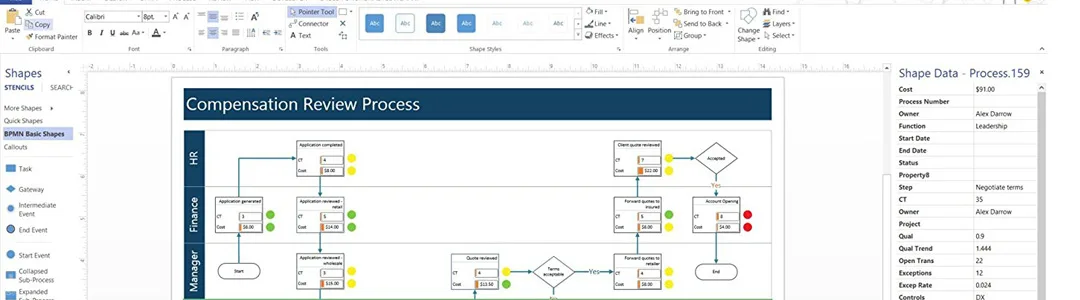
A Full Desktop Application, Not a Browser Tab
Visio 2019 Professional installs locally on your PC, so diagrams open and save instantly without depending on a browser connection or an active Microsoft 365 session. Every diagram type in this edition — BPMN, UML, database models, network diagrams — is available offline once the software is activated.
That matters for anyone working with sensitive infrastructure or process diagrams: the file stays on your machine, under your own backup and access controls, rather than living in a cloud tenant you don’t fully manage.

Compared to Visio Plan 1
Visio Plan 1 is Microsoft’s lowest-tier subscription — a browser-based diagramming tool with basic templates and no desktop app. Visio 2019 Professional costs less over time as a single purchase and includes the full desktop application plus advanced diagram types Plan 1 doesn’t offer, like BPMN and UML validation.
If you only need to view or lightly edit diagrams occasionally, the online plan can make sense. For anyone producing technical diagrams regularly, the desktop license is the better fit.

Compared to Visio Plan 2
Visio Plan 2 adds the desktop app and advanced features on top of Plan 1, but bills monthly or annually for as long as you use it. Visio 2019 Professional covers the same core professional feature set — data-linked diagrams, database modeling, standards validation — for a one-time price instead of a recurring one.
The tradeoff is version currency: Plan 2 stays on Microsoft’s current release, while Visio 2019 Professional stays on the 2019 feature set. For most diagramming work, that difference doesn’t affect day-to-day use.
Compared to Visio 2019 Standard
Visio 2019 Standard covers basic flowcharts and org charts but leaves out BPMN 2.0 and UML 2.5 validation, data-linked diagrams, and database model diagrams — all included in the Professional edition. If your diagrams need to pass review against a formal standard or connect to live data, Standard doesn’t cover it.
If you’re also managing project timelines alongside your diagrams, MCAKey pairs Visio with Microsoft Project in the Project Professional + Visio Professional 2019 bundle, which covers both at a lower combined price than buying separately.
Visio 2019 Professional
What is included with your purchase.
Genuine License Key by Email
You’ll receive a genuine Visio 2019 Professional license key by email, usually within minutes of completing checkout. No physical media, no waiting for shipping.
Lifetime License — Pay Once
This is a one-time purchase with no recurring subscription fee. Activate it once and the license stays valid on that PC for as long as you use it.
Online Activation in Minutes
Activation happens over the internet directly through Microsoft’s servers. Enter the key inside Visio and it’s activated in a few minutes — no phone call required.
Full Visio 2019 Update Access
Your key entitles you to all Visio 2019 security patches and feature updates Microsoft releases for this version, delivered through normal Windows update channels.
Windows 10/11 & Windows Server Compatibility
Visio 2019 Professional installs on Windows 10, Windows 11, or Windows Server 2019 and later, in both 32-bit and 64-bit versions.
Activation Support Included
If activation doesn’t go through on the first try, our support team is available by WhatsApp, live chat, and email to help you get it sorted.
Visio 2019 Professional requires Windows 10 or Windows Server 2019 or later — both 32-bit and 64-bit installations are supported. An internet connection is needed for online activation; no other special hardware is required beyond a standard Windows PC.
Visio 2019 Professional — Common Questions
What buyers usually ask before purchasing this license.
Is this a subscription, or do I own the license?
It’s a one-time purchase. You pay once, activate the key, and it’s yours to keep — there’s no recurring charge and no expiration date, unlike Visio Plan 1 or Plan 2.
What if my Visio 2019 key doesn’t activate?
Reach out through our FAQ and support page — most activation issues are resolved within minutes over live chat or WhatsApp.
Does this work on Windows 11, and is there a Mac version?
Yes, this key activates on Windows 10, Windows 11, and Windows Server 2019 or later, in 32-bit or 64-bit. Visio does not have a native Mac version — running it on macOS requires Windows virtualization software like Parallels or Boot Camp.
What’s the difference between Visio 2019 Standard and Professional?
Professional adds diagram types Standard doesn’t include — BPMN 2.0 and UML 2.5 validation, data-linked diagrams, and database model diagrams. If you only need basic flowcharts and org charts, Standard is enough; anything more technical needs Professional.
Want more ?
![Project 2021 Professional Plus For 1 PC [ Online activation ]](https://mcakey.com/wp-content/uploads/2024/07/Project-Professional-2021-1-600x745.webp)
![Project 2019 Professional Plus For 1 PC [ Online activation ]](https://mcakey.com/wp-content/uploads/2024/07/Project-Professional-2019-600x745.webp)
![Project Professional 2024 Activation Key Activation Key [ Online ]](https://mcakey.com/wp-content/uploads/2025/04/project-2024-professional-600x745.webp)
 Visio 2019 Professional Key Fo...
 $6.99

Gerda (verified owner) –
The fastest digital delivery I’ve experienced, highly recommend.
Vicente (verified owner) –
The product was ready to use within minutes, great service.
Joshua (verified owner) –
The product was ready to use almost instantly, highly recommend.
Graciela (verified owner) –
Been using it for a while, I usually don’t write a review but this time I am truly convinced to write.
Dorthy (verified owner) –
The email delivery was lightning fast, highly recommend this store.
Margaret (verified owner) –
The product was delivered right away, fantastic service.
Dena (verified owner) –
The product was delivered almost immediately, very convenient.
Fae (verified owner) –
The email delivery was super quick, and the product is fantastic.
Viola (verified owner) –
I appreciate the fast delivery and high-quality product.
Maggie (verified owner) –
I love how fast the download was, perfect for my needs.
Haylie (verified owner) –
Instant access and top-quality digital download, very satisfied.
Hillary (verified owner) –
Been using a lot of items, this one is obviously the best
Antonio (verified owner) –
This is the coolest thing I’ve found on here! Will keep using your products in the future!
Ana (verified owner) –
Fast and reliable digital download, will definitely buy again.
Emanuel (verified owner) –
The item and the design are very cool. Also the support is amazing, they always help you with any detail that you have.
Zackery (verified owner) –
The digital download was smooth and super quick.
Leora (verified owner) –
Instant access and a fantastic digital product, very happy.
Colleen (verified owner) –
Quick and easy access to a top-quality digital product, highly recommend.
Lucas (verified owner) –
Delivered straight to my email, no issues at all.
Keyon (verified owner) –
The fastest delivery I’ve experienced, fantastic service.
Jameson (verified owner) –
Instant download and top-quality digital product.
Kenny (verified owner) –
The product was in my inbox right after purchase, so convenient.
Alejandra (verified owner) –
The email delivery was super quick, and the product is excellent quality.
Freida (verified owner) –
Fast delivery and excellent quality digital product.
Carli (verified owner) –
Instant access to the product, very happy with the purchase.
Randy (verified owner) –
I think this is amazing. Lots of features and customizable from every point of view. The few times I asked for help in support they were competent, fast and above all very patient. Really recommend
Tavares (verified owner) –
Instant download and excellent customer support.
Austin (verified owner) –
Immediate download and excellent quality, very satisfied.
Troy (verified owner) –
Fast, efficient, and high-quality digital product.
Chet (verified owner) –
I was able to download the product immediately, fantastic!
Pearlie (verified owner) –
I rarely leave a comment, but this item is beyond worth it! Gotta let you guys know!