


No products in the cart.

This product is also available in a bundle Save Money
![Project Professional 2024 Activation Key Activation Key [ Online ]](https://mcakey.com/wp-content/uploads/2025/04/project-2024-professional-150x150.webp)
Project Professional 2024 Activation Key Activation Key [ Online ]
$199.99
+
![Visio Professional 2024 Activation Key Activation Key [ Online ]](https://mcakey.com/wp-content/uploads/2025/04/visio-2024-professional-150x150.webp)
Visio Professional 2024 Activation Key Activation Key [ Online ]
$199.99
Project Professional 2024 + Visio Professional 2024
$100.00
$399.98 separately
Save 75% View Bundle → Visio Professional 2024 License Key — Turn Complex Information Into Clear Diagrams
Visio Professional 2024 is a lifetime, genuine license key for creating professional flowcharts, network diagrams, and org charts in Microsoft Visio, delivered by email within minutes. It’s built for IT professionals, business analysts, engineers, and project managers who need to visualize systems and processes clearly, not just describe them in a document. The Professional edition adds the advanced stencils, data-linking, and collaboration tools that Visio Standard leaves out.
The main alternative is a Visio Plan subscription through Microsoft 365, billed every month for as long as you use it. This is a one-time purchase instead — buy the key once, activate it online, and Visio Professional 2024 is yours to keep on that PC with no recurring charge. MCAKey is a Certified Microsoft Partner, so every key ships through legitimate Microsoft licensing channels.
- License TypeGenuine License Key
- ActivationOnline Activation
- DeliveryEmail, within minutes
The ribbon interface will feel familiar if you’ve used any other Office app, and the redesigned stencil panel makes it faster to find the right shape for network diagrams, floor plans, or process flows. Drag-and-drop connectors snap to shapes automatically, so diagrams stay readable as they grow.
For teams, that familiarity matters. A business analyst can hand a Visio file to an IT admin and both read it the same way, without translating between tools. That shared visual language is why Visio shows up as the default diagramming standard in so many IT departments and PMOs.
What Is Included in Visio Professional 2024
Eight of the core capabilities you get with a Visio Professional 2024 license key.
Cloud & Network Architecture Diagrams
Visio Professional 2024 includes dedicated Azure and AWS shape libraries built for modern cloud infrastructure. Use them when you need to document a network topology or cloud deployment that other engineers can actually act on.
Real-Time Co-Authoring
Multiple people can edit the same diagram at once, with changes appearing as they happen. Useful when a diagram needs sign-off from more than one department before it’s finalized.
Data-Linked Diagrams
Shapes can link directly to an Excel spreadsheet or external database, so the diagram updates when the underlying data changes. This keeps org charts and process maps accurate without manually redrawing them.
Extensive Shape & Template Library
Thousands of templates and stencils cover IT infrastructure, business process mapping, and industry-specific diagrams. Start from a template instead of a blank canvas when you’re under a deadline.
Information Rights Management (IRM)
IRM lets you control who can open, edit, or print a diagram, which matters for anything containing sensitive network or business data. Set permissions once and they travel with the file.
Workplace & Floor Plan Templates
Built-in templates cover office layouts, including space-planning configurations for modern workplace requirements. Facility managers use these to plan seating and desk arrangements without a separate CAD tool.
Microsoft 365 Integration
Visio Professional 2024 shares diagrams directly through Teams, OneDrive, and SharePoint. Send a diagram for review without leaving the apps your team already works in.
Instant Email Delivery
Your Visio Professional 2024 license key arrives by email within minutes of purchase, ready to activate. No waiting on physical media or a manual fulfillment queue.
Visio Professional 2024 — Why Professionals Choose It
A closer look at the features that separate Professional from Visio Standard.
Built for Cloud & Infrastructure Diagrams
The Professional edition’s Azure and AWS stencil sets are the main reason IT teams upgrade from Standard. Instead of hand-drawing cloud architecture with generic boxes, you drag in shapes that actually match what’s deployed — VNets, subnets, load balancers, S3 buckets — so the diagram is something an engineer can act on.
This pairs naturally with project documentation. If your team also plans rollouts in Project Professional 2024, the two apps share the same Microsoft 365 file locations, so architecture diagrams and project schedules can live in the same SharePoint site.
Real Collaboration, Not Just File Sharing
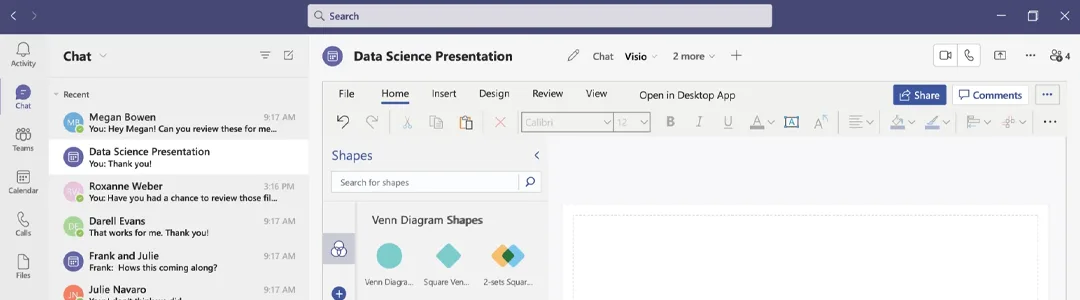
Real-time co-authoring means two people can be in the same Visio file at once, each seeing the other’s edits as they’re made. That’s different from the old workflow of emailing a .vsdx file back and forth and hoping nobody overwrites the latest version.
Because it’s tied into Microsoft 365, sharing a diagram through Teams or SharePoint doesn’t require exporting to PDF first — reviewers can comment directly on the shapes that need changes.
Diagrams That Stay Current
Data-linked diagrams pull from an Excel sheet or external data source, so an org chart or process map updates automatically instead of going stale the week after you draw it. This matters most for org charts, inventory diagrams, and anything else that changes on a schedule you don’t control.
Business analysts use this to keep process maps aligned with the systems they document — when a workflow changes upstream, the diagram reflects it instead of needing a redraw.
Security That Travels With the File
Information Rights Management lets you restrict who can open, copy, or print a diagram before you send it anywhere. That’s the difference between hoping a sensitive network diagram doesn’t leave the intended audience and actually enforcing it.
For regulated industries or anyone documenting infrastructure that shouldn’t be public, IRM is the reason Visio Professional gets chosen over free diagramming tools that don’t offer any access control.
Visio Professional 2024
What is included with your purchase.
Genuine License Key by Email
Your Visio Professional 2024 key arrives by email, usually within minutes of checkout. No physical packaging, no shipping wait.
Lifetime License — Pay Once
This is a one-time purchase, not a subscription. Activate it once and Visio Professional 2024 is yours to use on that PC for as long as you want, with no renewal fee.
Online Activation in Minutes
Activation happens automatically over the internet when you enter the key during setup — no phone call required. Most installs finish activating within a few minutes.
Full Visio Professional 2024 Update Access
You get official Microsoft updates for Visio Professional 2024, including security patches and feature updates released for this version.
Genuine Desktop Application
This installs the full Visio Professional 2024 desktop app directly on your Windows PC — not a limited web viewer or trial version.
Activation Support Included
If you run into any issue during setup or activation, reach out to our support team by live chat, WhatsApp, or email and we’ll walk you through it.
Visio Professional 2024 installs on a Windows PC. Exact requirements vary by device — check Microsoft’s current Visio 2024 system requirements against your Windows version before installing.
Visio Professional 2024 — Common Questions
What buyers usually ask before purchasing a Visio Professional 2024 license key.
Is this a one-time purchase or a subscription?
It’s a one-time purchase. You pay once for the Visio Professional 2024 license key, activate it, and there’s no recurring charge — unlike a Visio Plan subscription through Microsoft 365.
What happens if online activation doesn’t work?
Contact our support team through live chat, WhatsApp, or email and we’ll help you complete activation. Most activation issues are resolved within minutes.
Does Visio Professional 2024 run on Mac?
No. Visio is a Windows desktop application — Microsoft has never released a native Mac version, so this key is for installation on a Windows PC only.
Is this a Retail, OEM, or Volume license?
The license channel isn’t specified for this listing — what you receive is a genuine Visio Professional 2024 key that activates directly through Microsoft’s own activation servers.
Want more ?
![Visio 2021 Professional Key For 1 PC [ Online activation ]](https://mcakey.com/wp-content/uploads/2024/07/Visio-Professional-2021-600x745.webp)

 Visio Professional 2024 Activa...
 $199.99

Nella (verified owner) –
Think everyone should know about this, it’s just beyond my expectations
Skye (verified owner) –
The product was delivered to my inbox within minutes, so impressed!
Camryn (verified owner) –
Fast delivery and excellent quality digital product, very happy with my purchase.
Jennings (verified owner) –
The product was ready to use within moments, very convenient.
Rylan (verified owner) –
The digital product was exactly as described, quick download.
Queenie (verified owner) –
The fastest digital download I’ve ever had, great service.
Cordell (verified owner) –
Super fast email delivery, just what I needed.
Estefania (verified owner) –
The email delivery was super quick, and the product is excellent quality.
Friedrich (verified owner) –
Fast and reliable digital download, will definitely buy again.
Alta (verified owner) –
Easy to purchase and download, very convenient.
Porter (verified owner) –
The first time I got the urges to leave a comment, but this is simply a top-notch thing you can find.
Adell (verified owner) –
The item and the design are very cool. Also the support is amazing, they always help you with any detail that you have.
Mertie (verified owner) –
The best place for fast digital downloads, will buy again.
Adrain (verified owner) –
The product was delivered almost instantly, great service.
Tyrell (verified owner) –
The fastest and easiest digital download I’ve ever had.
Ellis (verified owner) –
The product was delivered via email in seconds, very convenient.
Charlene (verified owner) –
The delivery was lightning fast, very satisfied with the product.
Adalberto (verified owner) –
The product was in my inbox within seconds, very satisfied.
Heaven (verified owner) –
The fastest digital download I’ve ever had, very satisfied.
Kelli (verified owner) –
I think this is amazing. Lots of features and customizable from every point of view. The few times I asked for help in support they were competent, fast and above all very patient. Really recommend
Halle (verified owner) –
Fast and smooth download, excellent quality digital product.