


No products in the cart.

This product is also available in a bundle Save Money
![Project 2021 Professional Plus For 1 PC [ Online activation ]](https://mcakey.com/wp-content/uploads/2024/07/Project-Professional-2021-1-150x150.webp)
Project 2021 Professional Plus For 1 PC [ Online activation ]
$7.99
+
![Visio 2021 Professional Key For 1 PC [ Online activation ]](https://mcakey.com/wp-content/uploads/2024/07/Visio-Professional-2021-150x150.webp)
Visio 2021 Professional Key For 1 PC [ Online activation ]
$7.99
Visio 2021 Professional License Key — Diagram Like a Pro
Visio 2021 Professional is a lifetime license key for creating flowcharts, org charts, network diagrams, and process maps on Windows, delivered by email. It’s built for IT teams, business analysts, and project managers who need to visualize systems and workflows without paying for a monthly subscription. This Professional edition adds the industry-standard diagram types and data-linking tools that the Standard edition leaves out.
Unlike Visio Standard, the Professional edition validates diagrams against BPMN 2.0, UML 2.5, and other formal notations, and it connects shapes directly to live data from Excel, SQL Server, and Azure Active Directory. MCAKey is a Certified Microsoft Partner, so this key ships through an official channel rather than a gray-market reseller.
- License TypeGenuine License Key
- ActivationOnline Activation
- Devices1 PC
- PlatformWindows 10/11, 32 & 64-bit
- DeliveryEmail, within minutes
The canvas supports touch and pen input, so you can sketch and annotate diagrams by hand on a tablet or touchscreen laptop instead of dragging shapes with a mouse. Replacing a shape in an existing diagram keeps your layout and connections intact, so revising a flowchart doesn’t mean rebuilding it from scratch.
For teams, that translates into diagrams that stay accurate as systems change — a network diagram linked to an Excel inventory sheet updates itself instead of going stale in a shared drive. Presence indicators show who’s editing a shared file in real time when it’s stored on OneDrive for Business or SharePoint.
What Is Included in Visio 2021 Professional
The diagramming tools, data connections, and collaboration features in this license.
Ready-Made Templates & Thousands of Shapes
Visio 2021 Professional ships with prebuilt templates and a shape library covering flowcharts, org charts, floor plans, and network diagrams. Start from a template that matches your diagram type instead of building the layout from a blank canvas.
BPMN 2.0 & UML 2.5 Diagram Validation
Diagrams can be checked against Business Process Model and Notation (BPMN) 2.0, Unified Modeling Language (UML) 2.5, and Specification and Description Language (SDL). Use this when a diagram has to meet a formal notation standard for compliance or a technical handoff, not just look right.
Touch & Pen Drawing on Any Device
Draw and annotate diagrams directly with a finger or a pen on a touchscreen device, alongside the usual mouse and keyboard input. Useful for sketching a process flow in a meeting or marking up an existing diagram during a review.
Data-Linked Diagrams from Excel, SQL & Azure AD
Connect shapes to live data from Excel workbooks, SQL Server and Access databases, SharePoint lists, Exchange directories, or Azure Active Directory. Org charts and network diagrams generated this way update from the source data instead of being redrawn by hand.
Real-Time Co-Authoring
See presence indicators for who else is working on a shared diagram stored in the cloud, get notified of their changes, and choose when to merge them into the master file. Built for teams editing the same network diagram or process map without overwriting each other’s work.
Secure Cloud Sharing via OneDrive & SharePoint
Share finished diagrams through OneDrive for Business or SharePoint instead of emailing static image files around. Recipients always see the current version, and access can be restricted the same way as any other file in those services.
AutoCAD (DWG) File Import
Import AutoCAD DWG files directly into a Visio diagram, including support for newer DWG format versions. Useful when a facilities or engineering team hands off a CAD drawing that needs to be layered into a Visio-based floor plan or network diagram.
Full Version Updates for Visio 2021
This license activates the full Visio 2021 Professional release and includes the updates Microsoft ships for that version. You get security patches and stability fixes for as long as Microsoft supports Visio 2021, at no extra cost.
Visio 2021 Professional — Built for Real Diagramming Work
What using Visio 2021 Professional actually looks like day to day.
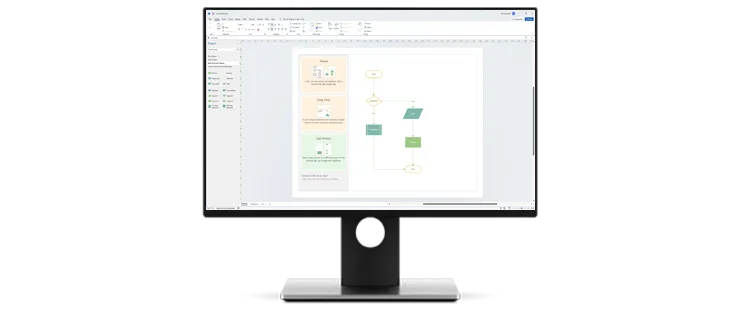
Diagram Documentation That Matches Real Systems
A network diagram is only useful if it reflects what’s actually deployed. Because Visio 2021 Professional links shapes to live data sources like SQL Server or Azure Active Directory, a diagram built from that data stays close to the real environment instead of drifting out of date the way a static drawing does.
That matters most for IT documentation — network topology, server inventories, org structures — where the diagram is a reference other people rely on, not just a one-time illustration.
![Visio 2021 Professional Key For 1 PC [ Online activation ]](https://mcakey.com/wp-content/uploads/2026/08/img-visio-3.webp)
Formal Notation Support for Technical Handoffs
When a diagram has to be understood the same way by every reader — a developer, an auditor, a process owner — informal boxes and arrows aren’t enough. Visio 2021 Professional validates diagrams against BPMN 2.0, UML 2.5, and SDL, so process maps and software diagrams follow a notation other tools and teams recognize.
That’s the practical difference from Visio Standard: Standard covers general-purpose diagramming, while Professional adds the notation compliance and data linking that IT and business-process work usually requires.
![Visio 2021 Professional Key For 1 PC [ Online activation ]](https://mcakey.com/wp-content/uploads/2026/08/img-visio-2.webp)
Collaboration Without Losing Track of Changes
Diagrams stored on OneDrive for Business or SharePoint show presence indicators for who’s currently editing, so a team working on the same flowchart or org chart can see each other’s activity in real time instead of emailing versions back and forth.
Changes can be reviewed and merged into the master file on your own schedule, which keeps one team member’s in-progress edits from overwriting someone else’s finished section.
![Visio 2021 Professional Key For 1 PC [ Online activation ]](https://mcakey.com/wp-content/uploads/2026/08/img-visio-1.webp)
A Canvas That Works With Touch, Pen, or Mouse
Replacing a shape in an existing diagram keeps the surrounding layout and connections intact, so a revision doesn’t mean rebuilding the whole page. Combined with touch and pen support, that makes Visio 2021 Professional practical for sketching a first draft on a tablet and refining it later at a desk.
It’s a small detail, but it’s the difference between treating a diagram as disposable and treating it as a document you keep updating over the life of a project.
Visio 2021 Professional
What is included with your purchase.
Genuine License Key by Email
Your Visio 2021 Professional key is sent to your inbox after checkout, ready to activate — no disc, no physical shipping, no waiting.
Lifetime License — Pay Once
This is a one-time purchase, not a subscription. Once activated, the license doesn’t expire and there’s no recurring fee.
Online Activation in Minutes
Enter the key inside Visio to activate over the internet. The whole process typically takes a few minutes from install to a fully activated copy.
Full Visio 2021 Update Access
Your license covers the updates Microsoft releases for Visio 2021, including security patches, so the installation stays current and supported.
Windows 10/11, 32 & 64-bit Support
The key activates Visio 2021 Professional on both 32-bit and 64-bit Windows 10 or Windows 11 installations, so it fits whichever build you’re already running.
Activation Support Included
If activation doesn’t go through cleanly, reach out to our support team via live chat, WhatsApp, or email and we’ll walk you through it.
Visio 2021 Professional runs on Windows 10 or Windows 11, in both 32-bit and 64-bit builds. It’s a Windows-only release — there’s no native macOS version.
Visio 2021 Professional — Common Questions
What buyers ask before purchasing this license.
Is this a one-time purchase or a subscription?
It’s a one-time purchase. You get a genuine Visio 2021 Professional license key by email, and once it’s activated the license doesn’t expire — there’s no recurring subscription fee.
What if the key doesn’t activate?
Contact our support team through live chat, WhatsApp, or email and we’ll help resolve it — most activation issues are solved within minutes.
Will this work on Windows 11, or only Windows 10?
Yes, this key activates on both Windows 10 and Windows 11, in 32-bit or 64-bit installations.
Is this the same as Visio Standard?
No. Visio 2021 Professional adds BPMN 2.0 and UML 2.5 diagram validation, data-linked diagrams from sources like Excel and Azure Active Directory, and AutoCAD import — none of which are in Visio Standard.
Want more ?
![Project 2019 Professional Plus For 1 PC [ Online activation ]](https://mcakey.com/wp-content/uploads/2024/07/Project-Professional-2019-600x745.webp)

 Visio 2021 Professional Key Fo...
 $7.99

Leta (verified owner) –
The fastest digital download I’ve ever experienced, great service.
Ulises (verified owner) –
Instant access and top-quality product, very satisfied.
Bonita (verified owner) –
The product was in my inbox right after purchase, so convenient.
Lisa (verified owner) –
Fast and reliable email delivery, great quality product.
Darrion (verified owner) –
Amazing digital product, delivered in seconds.
Jordan (verified owner) –
Quick and easy access to a top-quality digital product, highly recommend.
Janelle (verified owner) –
The download link was sent immediately, very happy with my purchase.
Marco (verified owner) –
The digital file was ready to use immediately, very satisfied.
Judson (verified owner) –
Fast delivery and great quality, very satisfied.
Maximilian (verified owner) –
It’s far better than those similar products, while the price is still acceptable.
Sidney (verified owner) –
The product was in my inbox almost immediately, very happy with my purchase.
Jesus (verified owner) –
The digital product was ready to use immediately, no issues.
Earnest (verified owner) –
Just love the design and the customer support is the nicest.
Alda (verified owner) –
I received the product instantly, great service.
Lisandro (verified owner) –
Fast email delivery and excellent quality, will buy again.
Alvis (verified owner) –
The product was delivered to my inbox within minutes, so impressed!
Nyah (verified owner) –
The fastest delivery I’ve experienced, fantastic service.
Kaelyn (verified owner) –
The email delivery was lightning fast, highly recommend this store.
Dayana (verified owner) –
Instant delivery and top-notch quality, highly recommend.
Alexandrine (verified owner) –
The delivery was lightning fast, highly recommend this store.