


No products in the cart.

Windows Server 2019 Standard License Key — Bridge Your Datacenter to Azure
Windows Server 2019 Standard is a lifetime license key for Microsoft’s server operating system, delivered by email within minutes of purchase. It’s built for physical or lightly virtualized workloads — file servers, print servers, domain controllers, line-of-business applications — that need a stable, fully supported platform without the cost of a software-defined datacenter build-out. MCAKey is a Certified Microsoft Partner, so every Windows Server 2019 Standard key sold here is genuine and sourced through official channels.
Standard and Windows Server 2019 Datacenter share the same core operating system, but Standard caps you at two Hyper-V virtual machines per license — Datacenter is unlimited — and skips the software-defined networking and Storage Spaces Direct features built for large virtualized datacenters. For a single physical server or a couple of VMs, which covers most small-business file, print, and application servers, Standard delivers the same security and management stack for a fraction of the price.
- License TypeGenuine License Key
- ActivationOnline Activation
- PlatformWindows Server 2019, 64-bit
- DeliveryEmail, within minutes
Administration runs through the same tools admins already know — Server Manager, PowerShell, and Windows Admin Center for a browser-based console that reaches every server on the network from one screen. If you’ve managed a Windows Server box before, there’s no retraining involved here.
For IT teams and MSPs supporting client infrastructure, Standard’s per-core licensing (sold in 2-core packs) lines up cleanly with typical single- or dual-socket hardware, so sizing a license to a physical server is straightforward instead of requiring the extra virtualization rights only Datacenter offers.
What Is Included in Windows Server 2019 Standard
Every core role and security feature in the Windows Server 2019 Standard license — nothing sold separately.
Hybrid Cloud with Azure
Azure Arc, Azure Backup, and Storage Migration Service connect on-premises workloads to Azure without re-architecting anything. Use it for cloud-based backup, monitoring, or a gradual path toward Azure without committing to a full migration today.
BitLocker Drive Encryption
Full-volume encryption protects the server’s data even if the physical drive is removed or the hardware is stolen. This matters most for branch-office servers or any machine that isn’t sitting in a locked, access-controlled room.
Remote Desktop Services
Built-in RDS lets admins manage the server remotely, and — with the right CALs — host published applications or full desktops for end users. It’s the same RDP stack used across the whole Windows Server family.
Containers & Isolated Environments
Run untrusted or legacy applications inside a container instead of directly on the host OS. Useful for testing software you don’t fully trust yet, or running Windows and Linux containers side by side on the same box.
Secure Boot & TPM 2.0
Secure Boot verifies the boot loader and OS files haven’t been tampered with before Windows Server even starts, blocking rootkits and bootkits at the firmware level. Combined with TPM 2.0 support, it closes off one of the more common attack paths on physical servers.
Active Directory & Group Policy
Standard includes full Active Directory Domain Services, so you can run domain controllers and enforce Group Policy across every joined machine. It’s the same AD DS found in every Windows Server edition — nothing here is cut down.
Hyper-V with Two Virtual Machines
Each license includes rights to run up to two Hyper-V virtual machines (or one physical plus one virtual instance) on the licensed hardware. That’s enough to separate a domain controller from a file server without buying Datacenter.
Ongoing Security Updates
Windows Server 2019 Standard receives the same monthly cumulative updates and security patches as Datacenter, delivered through Windows Update or WSUS. Mainstream support keeps the OS patched for the life of the license.
Windows Server 2019 Standard — Built for How IT Teams Actually Work
The features that matter once the server is racked, joined to the domain, and doing real work.

Manage Every Server from One Console
Windows Admin Center replaces a stack of separate tools — Server Manager, Hyper-V Manager, Failover Cluster Manager — with a single browser-based console. Add a server by hostname or IP and get live performance graphs, event logs, storage, and role management in one place, no client install required.
For a solo admin or a small IT team running a handful of servers, this cuts a lot of the RDP-into-each-box routine down to a few clicks from a browser tab, even on a laptop that’s never touched the domain before.

Administer Remotely, On Your Schedule
Remote Server Administration Tools and PowerShell remoting mean you don’t need to be physically at the server, or even on the same network segment, to make changes. Patch a server, restart a service, or pull event logs from home, a client site, or the road.
That matters more than it sounds for a small business without a dedicated server room — the machine can sit in a closet and still get managed like it’s sitting on your desk.

Security That Doesn’t Depend on Physical Access
BitLocker, Secure Boot, and Credential Guard work together so a stolen drive, a tampered boot process, or a credential-theft attempt each hit a wall instead of a working exploit. None of this needs third-party security software — it’s built into the license.
For regulated industries or anyone handling client data, having encryption and boot integrity checks on by default is often the difference between passing and failing a basic security audit.
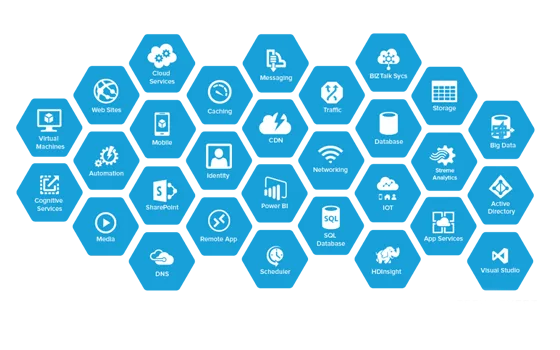
A Real Path to Azure, When You’re Ready
Azure Arc lets you manage on-premises Windows Server 2019 Standard machines alongside actual Azure resources from the same Azure portal — inventory, policy, and monitoring included, without moving a single workload off-site. Azure Backup and Azure Site Recovery plug in the same way for offsite backup and disaster recovery.
Pair it with a database workload — Microsoft SQL Server 2019 Standard is a common combination — and you get a hybrid setup that’s ready for Azure without a forced migration deadline.
Windows Server 2019 Standard
What is included with your purchase.
Genuine License Key by Email
Your Windows Server 2019 Standard key arrives by email, typically within minutes of payment clearing. No disc, no USB drive, no shipping wait.
Lifetime License — Pay Once
This is a one-time purchase, not a subscription. Pay once, activate, and the license doesn’t expire or need renewing.
Online Activation in Minutes
Enter the key during setup, or later through Settings, and Windows Server 2019 Standard activates automatically over the internet. No phone call required.
Full Windows Server 2019 Update Access
Your installation is eligible for every security patch and cumulative update Microsoft releases for Windows Server 2019, delivered through Windows Update or WSUS.
64-bit Architecture Support
Windows Server 2019 Standard ships 64-bit only, matching every server processor sold since the platform’s release. There’s no 32-bit build to accidentally install.
Activation Support Included
If activation doesn’t go through on the first try, reach our support team by live chat, WhatsApp, or email and we’ll walk you through it.
Windows Server 2019 Standard requires a 64-bit processor at 1.4 GHz or faster, at least 2 GB of RAM (4 GB recommended for the Desktop Experience install), and 32 GB of free disk space minimum for the OS itself. It installs on physical hardware or as a virtual machine under Hyper-V, VMware, or another hypervisor.
Windows Server 2019 Standard — Common Questions
What buyers usually ask before activating a Windows Server 2019 Standard license key.
Is this a one-time purchase or a subscription?
One-time purchase. You pay once for the Windows Server 2019 Standard license key, and it doesn’t expire or require a renewal fee.
What happens if the key doesn’t activate?
Contact our support team with your order number and we’ll issue a replacement key or walk you through activation — most cases are resolved the same day.
Does this work on physical servers and virtual machines?
Yes. The license covers installation on physical hardware or as a virtual machine under Hyper-V or another hypervisor, and it includes rights to run up to two Hyper-V VMs on the licensed hardware.
Can I use this for business or corporate deployments?
Yes — Windows Server 2019 Standard is built for business use, including domain controllers, file and print servers, and line-of-business applications.
Want more ?
![Windows Server 2022 Datacenter Activation Key[ Online ]](https://mcakey.com/wp-content/uploads/2024/07/Windows-Server-2022-Datacenter-3-600x745.webp)
![Windows Server 2022 Standard Activation Key [ Online ]](https://mcakey.com/wp-content/uploads/2024/07/Windows-Server-2022-Standard-2-600x745.webp)
![Windows Server 2025 Datacenter Activation Key Activation Key [ Online ]](https://mcakey.com/wp-content/uploads/2025/04/Windows-server-2025-datacenter-600x745.webp)
 Windows Server 2019 Standard A...
 $12.00

Alden (verified owner) –
The product was delivered via email in seconds, very convenient.
Theo (verified owner) –
I appreciate the fast delivery and high-quality product.
Khalid (verified owner) –
The email delivery was super quick, and the product is excellent quality.
Anissa (verified owner) –
Fast and reliable digital download, will definitely buy again.
Israel (verified owner) –
The product was ready to use within moments, no issues at all.
Thora (verified owner) –
The delivery was lightning fast, very satisfied with the product.
Jalon (verified owner) –
The product was ready to use within moments, very convenient.
Conrad (verified owner) –
The download was quick, and the product is top quality.
Amparo (verified owner) –
I’m caught 🙂 Find my love and will never buy in any other shop.
Leonel (verified owner) –
The fastest digital download I’ve ever experienced, great service.
Vinnie (verified owner) –
This digital product is amazing, exactly what I needed.
Thelma (verified owner) –
Easy to purchase and download, very convenient.
Lacey (verified owner) –
The product was in my inbox within minutes, very convenient.
Torrey (verified owner) –
The product was in my inbox almost immediately, highly recommend.
Josue (verified owner) –
The email delivery was super quick, and the product is fantastic.
Aiden (verified owner) –
The fastest delivery I’ve experienced, fantastic service.
Hudson (verified owner) –
Instant access and top-quality digital download, very satisfied.
Carolanne (verified owner) –
The download was quick and easy, highly recommend this store.
Tyree (verified owner) –
The fastest digital delivery I’ve experienced, highly recommend.
Tania (verified owner) –
Quick and easy access to a top-quality digital product.
Destiney (verified owner) –
The product was in my inbox right after purchase, so convenient.
Katheryn (verified owner) –
The product was in my inbox within seconds, very satisfied.
Rosalyn (verified owner) –
Fast delivery and excellent quality digital product, very happy with my purchase.
Lou (verified owner) –
Quite easy to use, nice design, surely will buy again
Efren (verified owner) –
I received the download link immediately, very satisfied.
Dayana (verified owner) –
Quick and easy access to a top-quality digital product, highly recommend.
Toney (verified owner) –
Wished I had found this sooner, it took me a lot of money and time until I found my dream product here!
Destany (verified owner) –
The product was delivered right away, fantastic service.
Vincent (verified owner) –
The email delivery was lightning fast, great product.
Terrill (verified owner) –
The product was delivered via email right away, great service.
Kylee (verified owner) –
The fastest digital download I’ve ever experienced, very satisfied.
Nolan (verified owner) –
The email delivery was lightning fast, highly recommend this store.
Demarco (verified owner) –
The product was ready to use within minutes, highly recommend.
Archibald (verified owner) –
Quick and easy access to a high-quality digital product, highly recommend.
Alexis (verified owner) –
Fast, reliable, and high-quality digital product.
Rebeca (verified owner) –
Been using a lot of items, this one is obviously the best
Breanne (verified owner) –
Instant access to a fantastic digital product, highly recommend.
Bernadette (verified owner) –
The fastest digital download I’ve ever had, very satisfied.
Lafayette (verified owner) –
The product was delivered within seconds, great service.
Andrew (verified owner) –
The best digital download experience I’ve had so far.
Dejuan (verified owner) –
The product was delivered almost immediately, very convenient.
Daron (verified owner) –
The product was in my inbox in seconds, highly recommend this store.
Jayson (verified owner) –
I love how fast the download was, perfect for my needs.
Raoul (verified owner) –
I rarely leave a comment, but this item is beyond worth it! Gotta let you guys know!
Wyatt (verified owner) –
The best digital product I’ve ever purchased online.
Eliseo (verified owner) –
Delivered straight to my email, no issues at all.
Fletcher (verified owner) –
Fast and reliable email delivery, great quality product.
Dudley (verified owner) –
Fast and smooth download, excellent quality digital product.