


![Visio 2019 Professional Key For 1 PC [ Online activation ]](https://mcakey.com/wp-content/uploads/2024/07/Visio-Professional-2019-150x150.webp)
![Project 2019 Professional Plus For 1 PC [ Online activation ]](https://mcakey.com/wp-content/uploads/2024/07/Project-Professional-2019-150x150.webp)
Project 2019 Professional Plus — Full-Featured Project Management for Windows
Project 2019 Professional Plus is a lifetime license key for planning, scheduling, and managing projects on Windows, delivered by email within minutes. It’s built for project managers, team leads, and consultants who need real scheduling tools — Gantt charts, resource assignment, dependency tracking — instead of juggling spreadsheets. This 2019 release is the mature, stable version of Project Professional, the desktop client Microsoft sold as a one-time purchase before newer releases shifted toward subscription pricing.
The difference between this and a Project Online subscription is simple: you pay once and keep the software, with no recurring monthly charge for a desktop license. This is a genuine license key, not a trial. As a certified Microsoft Partner, MCAKey sources every Project 2019 Professional Plus key through authorized channels. If your team also handles process diagrams or org charts, Visio 2019 Professional runs on the same 2019 wave and pairs naturally with this release.
- ActivationOnline Activation
- Devices1 PC
- PlatformWindows 10 or later
- DeliveryEmail, within minutes
The interface hasn’t changed much from earlier Project versions on purpose — if you’ve used Project 2016 or 2013, you’ll recognize the Gantt Chart view, the Resource Sheet, and the Timeline pane immediately. Auto-scheduling fills in start and due dates as soon as you set task dependencies, so a delay in one task automatically pushes the ones that depend on it instead of leaving your plan wrong until you notice.
For teams running Project Server or Project Online, Professional Plus syncs schedules, resource assignments, and timesheets back to the shared environment — something Project Standard can’t do on its own. That makes it the edition IT departments actually deploy when more than one person needs to see and update the same project plan.
What Is Included in Project 2019 Professional Plus
Eight core capabilities in the Professional Plus desktop client.
Pre-Built Project Templates
Project 2019 Professional Plus ships with pre-built templates for common project types, so you’re not starting a schedule from a blank grid. Use one when you need a working plan structure fast and can adjust it instead of building from scratch.
Gantt Charts & Multiple Timeline Views
Every schedule renders as an interactive Gantt chart, with several built-in timeline layouts you can switch between to show the same plan at different levels of detail. Use the simplified timeline view when presenting to stakeholders who don’t need to see every subtask.
Project Online & Project Server Sync
Professional Plus connects to Project Online and Project Server, syncing schedules and resource data with the rest of your organization’s project environment. This matters once more than one person is working from the same plan, since Project Standard can’t sync at all.
Team Timesheet Submission
Team members can submit timesheets directly against assigned tasks, recording both project time and non-project work in one place. Use it when you need actual hours logged against a schedule, not just planned hours.
What-If Scenario Planning
Run-case scenarios let you test different task assignments and resource loads before committing to a schedule, without touching the live plan. Use this when you’re deciding between two ways to staff a project and want to see the schedule impact of each first.
Automatic Dependency Scheduling
Set a dependency between two tasks and Project auto-fills the start and due dates that follow from it — move the first task, and everything downstream shifts with it. This keeps a large schedule accurate as things change, instead of you re-dating dozens of tasks by hand.
Resource & Task Assignment Management
Assign resources to tasks, see who’s overallocated, and level workloads across the whole project from the Resource Sheet. Use it before a schedule goes live to catch the person who’s been assigned to three tasks in the same week.
Genuine, Partner-Sourced License
Every key is a genuine Microsoft Project 2019 Professional Plus license, not a volume-license reseller key or a trial extension. It activates directly against Microsoft’s servers, the same as a key bought at retail.
Project 2019 Professional Plus — Built for Real Project Work
How the Professional Plus edition holds up once a plan gets complicated.
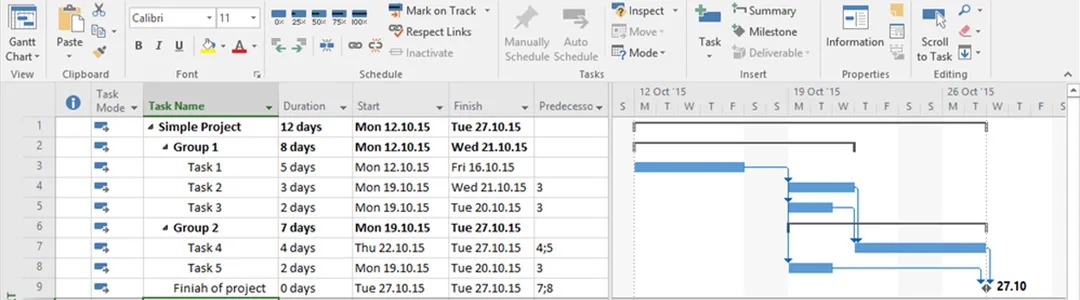
Plan Projects the Way Microsoft Actually Designed Them
The Gantt Chart view is still where most of the work happens — set a task, give it a duration, link it to the tasks it depends on, and Project draws the schedule for you. Pre-built templates for common project types mean you’re editing an existing structure instead of guessing at task breakdowns on day one.
Auto-fill scheduling means a slipped start date on one task automatically pushes every dependent task after it, so the plan you’re looking at stays accurate as work actually happens, not just as it was originally scheduled.
Sync Schedules With Project Online and Project Server
Professional Plus is the edition built to connect back to a shared Project Online or Project Server environment, syncing task assignments, resource data, and timesheets so everyone working from the same plan sees the same numbers. Project Standard, by comparison, is a standalone desktop tool with no sync option at all.
That sync matters most on any project with more than one contributor — a delay one team member enters shows up for everyone else immediately, instead of living in a file that only updates when someone remembers to send it around.
Professional Plus vs. Standard: What the Upgrade Actually Buys You
Project Standard covers basic scheduling — Gantt charts, task lists, simple timelines — but it stops there. Professional Plus adds resource leveling, timesheet submission, what-if scenario planning, and the Project Server/Online sync that Standard doesn’t have.
If you’re managing a project alone with no shared resources to track, Standard might be enough. Once a second person needs visibility into the same schedule, or you need to track actual hours against tasks, Professional Plus is the edition that actually does that.
Built for Teams Already Running Project Server
Organizations running an on-premises Project Server 2019 deployment need the Professional Plus client on every machine that’s going to sync with it — Project Standard won’t connect. This license gives you that client for one PC.
Even without an existing Project Server deployment, the same sync capability works with Project Online, so the edition is future-proof if your organization moves to a shared environment later without needing a different Project license.
Project 2019 Professional Plus
What is included with your purchase.
Genuine License Key by Email
You receive a genuine Project 2019 Professional Plus product key by email, usually within minutes of your order. No physical box, no disc — just the key and activation instructions.
Lifetime License — Pay Once
This is a one-time purchase, not a subscription. Activate it once and the license doesn’t expire or need to be renewed.
Online Activation in Minutes
Activate directly through Microsoft’s servers using the standard Office/Project sign-in and activation wizard. No phone call required.
Full Project 2019 Update Access
Your license is entitled to the security and feature updates Microsoft releases for Project 2019 Professional Plus, delivered the same way as any genuine copy.
Windows 10/11, 32 & 64-Bit Support
Project 2019 Professional Plus installs on Windows 10 or later, with both 32-bit and 64-bit installers available.
Activation Support Included
If activation doesn’t go smoothly, reach our support team by live chat, WhatsApp, or email and we’ll walk you through it.
Project 2019 Professional Plus requires Windows 10 or later — earlier Windows versions aren’t supported. Both 32-bit and 64-bit installers are available for a single PC.
Project 2019 Professional Plus — Common Questions
What buyers usually ask before purchasing this license.
Is this a one-time purchase or a subscription?
It’s a one-time purchase. You pay once, activate your Project 2019 Professional Plus license key, and there’s no renewal or recurring charge.
What happens if the key doesn’t activate?
Contact our support team through live chat, WhatsApp, or email and they’ll help you complete activation — this is covered under your purchase at no extra cost.
Which Windows versions does this run on?
Project 2019 Professional Plus requires Windows 10 or later, with both 32-bit and 64-bit versions supported.
Should I buy 2019 or a newer version?
Project 2019 Professional Plus is the right choice if you want a proven, stable release at a lower price point. If you specifically need the newest interface and features, Project 2021 Professional Plus is also available.
34 reviews for Project 2019 Professional Plus For 1 PC [ Online activation ]
Want more ?
![Project 2021 Professional Plus For 1 PC [ Online activation ]](https://mcakey.com/wp-content/uploads/2024/07/Project-Professional-2021-1-600x745.webp)
![Visio 2019 Professional Key For 1 PC [ Online activation ]](https://mcakey.com/wp-content/uploads/2024/07/Visio-Professional-2019-600x745.webp)
 Project 2019 Professional Plus...
$6.99

Jennifer (verified owner) –
Fast and smooth download, excellent quality digital product.
Madonna (verified owner) –
Fast and smooth digital download, very happy with the product.
Edwin (verified owner) –
The product was delivered via email right away, great service.
Rory (verified owner) –
I received my digital download in seconds, fantastic service.
Manuel (verified owner) –
The product was in my inbox within seconds, very satisfied.
Elfrieda (verified owner) –
The product was delivered almost instantly, great service.
Keshaun (verified owner) –
I like this item and also the customer service of them.
Elbert (verified owner) –
Instant delivery and excellent customer service.
Kristy (verified owner) –
Fast and reliable digital download, will definitely buy again.
Gianni (verified owner) –
The product was ready to use within moments, no issues at all.
Adam (verified owner) –
The download link was sent immediately, very satisfied.
Graciela (verified owner) –
Instant download and top-quality digital product.
Clifton (verified owner) –
Couldn’t believe how quickly I received my download!
Julien (verified owner) –
The fastest digital download I’ve ever experienced, great service.
Shyann (verified owner) –
The product was in my inbox almost immediately, very happy with my purchase.
Bernardo (verified owner) –
Fast, efficient, and high-quality digital product.
Aurore (verified owner) –
Fast, reliable, and high-quality digital product.
Adela (verified owner) –
The product was delivered to my inbox within minutes, so impressed!
Jimmie (verified owner) –
Fast delivery and excellent quality digital product, very happy with my purchase.
Rubie (verified owner) –
Fast and reliable email delivery, great quality product.
Tania (verified owner) –
The product was delivered almost immediately, very convenient.
Demarco (verified owner) –
Quick and easy access to a top-quality digital product, highly recommend.
Chloe (verified owner) –
Quite easy to use, nice design, surely will buy again
Alaina (verified owner) –
The fastest and easiest digital download I’ve ever had.
Estelle (verified owner) –
The download was quick, and the product exceeded my expectations.
Alisha (verified owner) –
The email delivery was super quick, and the product is fantastic.
Brandyn (verified owner) –
Been using a lot of items, this one is obviously the best
Chase (verified owner) –
Quick and easy download, excellent quality digital product.
Dereck (verified owner) –
The product was delivered straight to my inbox, very convenient.
Ayana (verified owner) –
The download was smooth and quick, very happy with my purchase.
Roberta (verified owner) –
Instant access and top-quality digital download, very satisfied.
Elwin (verified owner) –
The email delivery was super fast, and the product is excellent.
Hoyt (verified owner) –
I received my digital product almost instantly, very impressed.
Arne (verified owner) –
This store has the best fast delivery for digital products.