


No products in the cart.
Visual Studio Enterprise 2026 — Enterprise-Grade Development, Built to Scale
Visual Studio Enterprise 2026 is a lifetime license key for Microsoft’s top-tier integrated development environment, delivered by email. It’s built for development teams and organizations that need the full toolchain — architecture validation, load testing, and historical debugging — not just a code editor. If your team ships production software across desktop, web, cloud, and mobile, this edition is designed around that scale.
The difference from Visual Studio Professional isn’t cosmetic. Enterprise adds dependency-rule testing, IntelliTrace historical debugging, and cloud-scale load simulation that Professional doesn’t include — tools aimed at organizations coordinating multiple developers on one codebase, not solo developers working alone. As a Certified Microsoft Partner, MCAKey sources this key through Microsoft’s own licensing channels.
- License TypeGenuine License Key
- ActivationOnline Activation
- PlatformWindows
- DeliveryEmail, within minutes
Inside the IDE, Code Map turns tangled dependencies into a browsable diagram, so you can see how a change in one module ripples through a large codebase before you make it live. IntelliCode adds inline suggestions ranked from patterns across thousands of real projects, so autocomplete gets more useful the longer you work in a file.
For engineering leads, the value sits in the DevOps toolchain: automated CI/CD pipelines, capacity testing that simulates large numbers of virtual users, and Live Share sessions for pairing with teammates in real time on the same codebase — tooling a growing dev team eventually needs, bundled in rather than pieced together from separate tools.
What Is Included in Visual Studio Enterprise 2026
Eight of the Enterprise-only tools that separate this edition from Visual Studio Professional.
Automated Architecture & Dependency Testing
Tests run automatically as you write code, flagging broken dependencies or violated architecture rules before you commit. Useful for teams enforcing consistent structure across a large, multi-developer codebase.
Code Map Dependency Visualization
Code Map draws your project’s dependencies as a browsable diagram instead of a wall of file names. Use it to understand an unfamiliar codebase or trace how a change will ripple outward before you make it.
IntelliTrace Historical Debugging
IntelliTrace records what your application did leading up to a crash, so you can step backward through execution instead of only forward from a breakpoint. It’s built for the intermittent bugs that are hard to reproduce on demand.
Automated CI/CD Pipelines
Visual Studio Enterprise 2026 ships with a full DevOps toolchain for building continuous integration and deployment pipelines. Set it up once and every commit gets built, tested, and deployed without manual steps.
Cloud-Scale Capacity Testing
Simulate large numbers of virtual users hitting your application at once to find where it breaks under load. Run this before a launch instead of finding out during one.
Live Share Real-Time Collaboration
Live Share lets a teammate join your exact coding session — same open files, same debugging state — without cloning the repo first. Built for pairing and code reviews that need more than a screen share.
AI-Assisted Code Suggestions
IntelliCode ranks autocomplete suggestions using patterns learned from thousands of real projects, not just alphabetical order. It gets more accurate the more consistent your codebase’s own style already is.
Faster Solution Loading and Builds
Visual Studio Enterprise 2026 loads large solutions and compiles them noticeably faster than earlier versions. On a big enterprise codebase, that difference adds up across a workday.
Visual Studio Enterprise 2026 — Built for Teams, Not Just Developers
Four areas where the Enterprise edition earns its price over Professional.
Governance and Testing at Enterprise Scale
Solo developers rarely need dependency-rule enforcement or architecture validation — a small codebase doesn’t have room to drift. Visual Studio Enterprise 2026 is built for the opposite situation: multiple developers touching the same large codebase, where structure needs to be enforced automatically instead of caught in code review after the fact.
Automated component testing and dependency-rule checks run as you write code, flagging violations before they reach a pull request. On a codebase maintained by a growing team, that catches problems while they’re still cheap to fix.
A Faster, Smarter Coding Experience Every Day
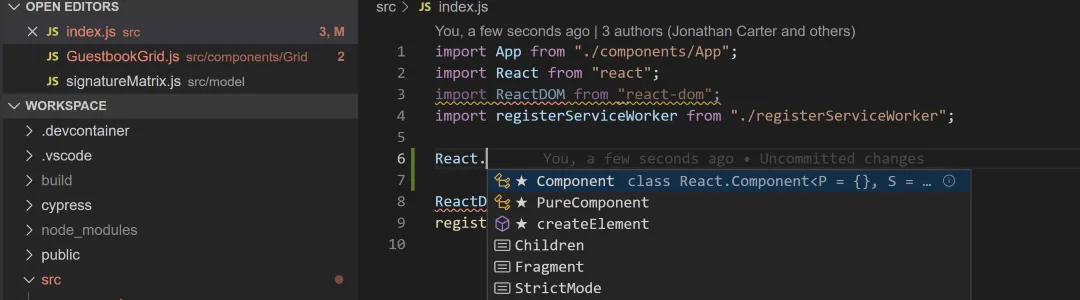
Day to day, the tools that matter most are the ones you touch constantly. IntelliCode ranks autocomplete suggestions using patterns learned from real open-source projects, so what it suggests is closer to what you’d actually write yourself, not just the alphabetically first option.
Solution load times and build speed matter just as much on a large project — Visual Studio Enterprise 2026 handles big solutions noticeably faster than earlier releases, which adds up across a full workday of building and testing changes.
A Complete DevOps Toolchain, Not Just an Editor
Visual Studio Enterprise 2026 includes automated CI/CD pipeline tooling, so builds, tests, and deployments run on every commit without someone manually kicking them off. For a team shipping regularly, that removes one of the more error-prone manual steps in the release process.
Capacity testing is bundled in too — simulate a large number of virtual users against your application to see where performance breaks down, before real users find out for you.
Where Enterprise Differs From Professional
Visual Studio Professional covers what an individual developer or small team needs day to day. Visual Studio Enterprise 2026 adds the tools that only start to matter once you’re coordinating multiple developers on one codebase — IntelliTrace historical debugging, Code Map, architecture testing, and the full DevOps toolchain.
If you’re working solo, Visual Studio Professional 2026 covers the essentials for less. Enterprise is worth the difference once a team, not just one developer, depends on the codebase staying consistent.
Visual Studio Enterprise 2026
What is included with your purchase.
Genuine License Key by Email
You receive your Visual Studio Enterprise 2026 license key by email, usually within minutes of payment. No physical packaging, no waiting on shipping.
Lifetime License — Pay Once
This is a one-time purchase, not a subscription. Once activated, the license doesn’t expire and there’s no renewal fee to keep the software working.
Online Activation in Minutes
Activate directly inside Visual Studio using the key you receive — no phone call required. The whole process typically takes a few minutes.
Full Visual Studio Enterprise 2026 Update Access
Your license covers ongoing updates and patches for Visual Studio Enterprise 2026, including security fixes and feature updates Microsoft releases for this version.
Windows Development Environment
Visual Studio Enterprise 2026 installs on Windows and targets desktop, web, cloud, and mobile projects from the same IDE.
Activation Support Included
If you run into an issue during setup or activation, reach our support team and we’ll help you get it working.
Visual Studio Enterprise 2026 runs on a Windows PC and is used to build and debug desktop, web, cloud, and mobile applications from a single IDE. Check Microsoft’s current Visual Studio system requirements for the disk space and OS build needed for the specific workloads you plan to install.
Visual Studio Enterprise 2026 — Common Questions
What buyers usually ask before purchasing this license key.
Is this a one-time purchase or a subscription?
It’s a one-time purchase. You pay once for the Visual Studio Enterprise 2026 license key and it doesn’t expire or require a renewal fee.
What if activation doesn’t work?
Contact our support team and we’ll walk you through it — most activation issues are resolved within minutes over chat or email.
Will this work on my version of Windows?
Visual Studio Enterprise 2026 installs on Windows and supports building for desktop, web, cloud, and mobile targets. Check Microsoft’s official system requirements for your specific Windows build before installing.
What’s the difference between this and Visual Studio Professional?
Enterprise adds tools Professional doesn’t include — automated architecture testing, IntelliTrace historical debugging, cloud-scale capacity testing, and a full CI/CD DevOps toolchain. Professional is aimed at individual developers and small teams; Enterprise is built for larger organizations.
Want more ?
![Visual Studio 2022 Enterprise Activation Key Activation Key [ Online ]](https://mcakey.com/wp-content/uploads/2025/04/visual-studio-2022-enterprise-key-600x745.webp)
![Visual Studio 2019 Enterprise Activation Key Activation Key [ Online ]](https://mcakey.com/wp-content/uploads/2025/04/Visual-Studio-2019-Enterprise-600x745.webp)
![Visual Studio 2019 Professional Activation Key Activation Key [ Online ]](https://mcakey.com/wp-content/uploads/2025/04/Visual-Studio-2019-Professional-600x745.webp)
![Visual Studio 2022 Professional Activation Key Activation Key [ Online ]](https://mcakey.com/wp-content/uploads/2025/04/Visual-Studio-2022-Professional-1-600x745.webp)
 Visual Studio Enterprise 2026 ...
 $119.99
