


No products in the cart.
This product is also available in a bundle Save Money
![Windows 11 Professional Activation Key [ Online ]](https://mcakey.com/wp-content/uploads/2024/07/windows-11-professional-2-150x150.webp)
Windows 11 Professional Activation Key [ Online ]
$139.99
+
Visual Studio Professional 2026 Online Activation
$119.99
Visual Studio Professional 2026 — The Full-Featured IDE Built for Serious Development
Visual Studio Professional 2026 is a lifetime license key for Microsoft’s professional integrated development environment (IDE), delivered by email. It’s the edition built for developers and small teams who’ve outgrown the free Community tier — commercial use isn’t restricted to a handful of seats, and the tooling includes features Community leaves out entirely. As a Certified Microsoft Partner, MCAKey sources every Visual Studio Professional 2026 license key through official Microsoft channels, so it activates the same way a key bought directly from Microsoft would.
The real difference from Visual Studio Community shows up the moment a team grows past a handful of people or takes on paid client work — Community’s license terms cap out fast. Professional removes that ceiling and adds tooling Community doesn’t include at all: cloud-based load testing, IntelliCode team completions, and unlimited private Git repositories through Azure DevOps. It costs less than Enterprise while covering what most individual developers and small dev teams actually use day to day.
- License TypeGenuine License Key
- ActivationOnline Activation
- DeliveryEmail, within minutes
Open it up and it’s the Visual Studio layout every version has shipped with — Solution Explorer on one side, an integrated terminal at the bottom, Team Explorer for source control, and a debugger that can be pinned wherever it’s useful across two or three monitors. IntelliSense and IntelliCode AI-assisted completions run across C#, C++, Python, JavaScript, TypeScript, and the rest of the languages Visual Studio supports, so the editor is suggesting relevant completions instead of just matching text.
For a team, the value is less about any single feature and more about not hitting a wall later. Azure DevOps integration, Live Share for pairing with a remote teammate in real time, and cloud-based load testing are all included rather than gated behind a separate purchase — the kind of tooling that matters once a side project turns into paid client work or a small in-house team.
What Is Included in Visual Studio Professional 2026
Everything in the Professional edition of Microsoft’s IDE, unlocked with one license key.
Full IDE & Multi-Monitor Editor Layout
The complete Visual Studio editor — Solution Explorer, integrated terminal, and a debugger you can pin to a second monitor. Useful the moment a project gets big enough that scrolling between five open files stops being practical.
Multi-Platform & Multi-Language Support
Builds for .NET, C++, Python, JavaScript/TypeScript, and mobile targets from the same install, covering x86, x64, and ARM64. Useful for teams maintaining more than one type of application without switching IDEs.
Integrated Debugger & Live Diagnostics
Step through code, inspect variables, and profile performance without leaving the editor, including live diagnostics while the app is running. Useful for tracking down a bug that only shows up under real load rather than in a unit test.
Git & Azure DevOps Integration
Unlimited private Git repositories through Azure DevOps, plus built-in pull request and branch management inside the editor. Useful for teams who want source control and CI/CD without wiring up a separate service.
Live Share Real-Time Collaboration
Share an active coding or debugging session with a teammate in real time, including their own cursor and terminal access, without either person leaving their own machine. Useful for pairing on a bug or walking a junior dev through a fix remotely.
Cloud-Based Load Testing
Run load tests against a web app from Azure’s infrastructure instead of your own machine, so you can see how it holds up under real concurrent traffic. Useful before a launch, when guessing at capacity isn’t good enough.
Continuous Updates & Servicing
Every Visual Studio Professional 2026 update — feature releases, security patches, and language or runtime support as it ships — is included at no extra cost for the life of the license. Useful for staying current without a separate maintenance fee.
Online Activation, Ready in Minutes
The license key activates online directly against Microsoft’s servers, no phone call needed. Useful for getting a fresh Visual Studio install running the same day it’s purchased.
Visual Studio Professional 2026 — Built to Match How You Actually Work
Four parts of the IDE that matter once a project moves past the prototype stage.
The Same Editor, Years of Refinement
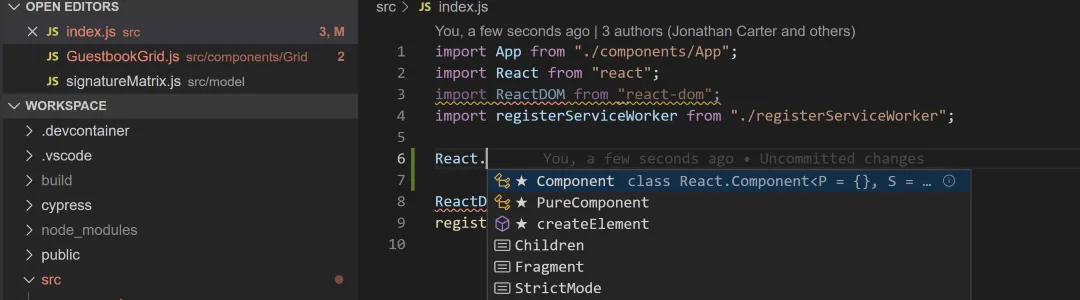
Visual Studio Professional 2026 keeps the layout developers already know — Solution Explorer, Properties window, integrated terminal — while IntelliSense and IntelliCode have gotten sharper with every release. Muscle memory from an older Visual Studio version carries straight over.
That continuity matters for teams onboarding a developer who’s used Visual Studio before but not this exact version. There’s no relearning the editor, just picking up the newer productivity features layered on top.
One Editor for C#, C++, Python, and the Web
Visual Studio Professional 2026 isn’t scoped to a single language — C#, C++, Python, JavaScript, TypeScript, and mobile development all run through the same install, with IntelliSense and IntelliCode tuned to each one. A backend developer working across a .NET API and a TypeScript frontend doesn’t need two editors.
Workloads — the language and platform toolsets — install through the Visual Studio Installer and can be added or removed later without reinstalling the whole IDE, so the setup only carries the weight of what’s actually being used.
A Debugger That Handles Real-World Bugs
The integrated debugger steps through code, inspects live variable state, and profiles CPU and memory use without switching tools. Combined with live diagnostics, it catches issues that only appear once the app is actually running under load — not just in a unit test.
For a bug that reproduces intermittently, the ability to attach the debugger to a running process and watch it in real time is often the difference between finding the cause in ten minutes and losing an afternoon to it.
Team Collaboration Without Extra Tools
Live Share lets a teammate join an active coding or debugging session in real time — their own cursor, their own terminal access — without leaving their own machine. Paired with Azure DevOps integration for unlimited private Git repos and built-in pull requests, a small team gets source control and pairing without adding a third-party service.
It’s the kind of setup that scales from a solo developer to a five-person team without switching tooling — everything needed for day-to-day collaboration ships with the Visual Studio Professional 2026 license itself.
Visual Studio Professional 2026
What is included with your purchase.
Genuine License Key by Email
The Visual Studio Professional 2026 license key is sent to your email address, usually within minutes of checkout. No physical packaging, no shipping wait.
Lifetime License — Pay Once
This is a one-time purchase, not a subscription. The key activates Visual Studio Professional 2026 permanently, with no renewal fee or expiration date to track.
Online Activation in Minutes
Activation runs through Microsoft’s own servers the first time Visual Studio is opened after entering the key — no phone call, no waiting on hold. An internet connection is needed for this initial step.
Full Visual Studio Professional 2026 Update Access
Feature updates, security patches, and new language or runtime support are included for the life of the license, at no extra cost.
64-bit Installer, Windows 10 & 11
Visual Studio Professional 2026 installs as a native 64-bit application and supports Windows 10 and Windows 11. Workloads for the specific languages and platforms you need install separately through the Visual Studio Installer.
Activation Support Included
If activation doesn’t go through on the first try, reach our support team by live chat, WhatsApp, or email — most activation issues are resolved the same day.
Visual Studio Professional 2026 requires a 64-bit edition of Windows 10 or Windows 11. Microsoft recommends at least 4 GB of RAM (8 GB or more for larger solutions) and an SSD for faster load and build times. Individual workloads — .NET, C++, Python, mobile development, and others — are added or removed at any time through the Visual Studio Installer, so only the tooling actually needed has to be installed.
Visual Studio Professional 2026 — Common Questions
What buyers usually ask before activating their key.
Is this a one-time purchase or a subscription?
It’s a lifetime license — pay once and the Visual Studio Professional 2026 license key activates the software permanently, with no renewal or subscription fee.
What if the key doesn’t activate?
Contact our support team by live chat, WhatsApp, or email with the error message you’re seeing — most activation issues are resolved the same day.
Does this work on Windows 11?
Yes. Visual Studio Professional 2026 installs on both Windows 10 and Windows 11, 64-bit editions.
Do I need an internet connection to activate?
Yes, briefly — online activation checks the key against Microsoft’s servers the first time you launch Visual Studio after entering it. After that, an internet connection isn’t required just to keep working.
Want more ?
![Visual Studio 2022 Enterprise Activation Key Activation Key [ Online ]](https://mcakey.com/wp-content/uploads/2025/04/visual-studio-2022-enterprise-key-600x745.webp)
![Visual Studio 2019 Enterprise Activation Key Activation Key [ Online ]](https://mcakey.com/wp-content/uploads/2025/04/Visual-Studio-2019-Enterprise-600x745.webp)
![Visual Studio 2019 Professional Activation Key Activation Key [ Online ]](https://mcakey.com/wp-content/uploads/2025/04/Visual-Studio-2019-Professional-600x745.webp)
![Visual Studio 2022 Professional Activation Key Activation Key [ Online ]](https://mcakey.com/wp-content/uploads/2025/04/Visual-Studio-2022-Professional-1-600x745.webp)
 Visual Studio Professional 202...
 $119.99
