


No products in the cart.

Visual Studio 2019 Enterprise — Enterprise-Grade Development, Licensed for Less
Visual Studio 2019 Enterprise is a lifetime license key for Microsoft’s enterprise-grade integrated development environment, delivered by email. It’s built for larger companies and programming teams that need a full toolchain for designing, testing, and deploying complex business applications — not just an editor, but a complete environment covering desktop, web, cloud, and mobile projects. Because Visual Studio can be tied into your organization’s own services and subscriptions, each team can shape the environment around how it actually works.
The main difference from Visual Studio 2019 Professional is scale: Professional is built for small businesses and solo developers, while Enterprise adds the tools larger teams actually need — live unit testing, IntelliTrace historical debugging, and a full DevOps toolchain for CI/CD. Buying through mcakey.com as a Certified Microsoft Partner gets you the same genuine license key at a fraction of the retail price, with delivery in minutes instead of a purchase-order process.
- License TypeGenuine License Key
- ActivationOnline Activation
- DeliveryEmail, within minutes
Day to day, the interface improvements matter as much as the big features. IntelliCode suggests completions based on patterns from thousands of open-source projects, and the refactoring and navigation tools are faster and more accurate than in Visual Studio 2017. Solution loads and builds are quicker too, so you spend less time waiting and more time writing code.
For a business, the value is in the tools that scale past a single developer: a DevOps toolchain with automated CI/CD pipelines, capacity testing that simulates unlimited virtual users, and diagnostics that work across desktop, web, cloud, and mobile targets. Those are the features a growing team eventually needs and a single Professional license doesn’t include.
What Is Included in Visual Studio 2019 Enterprise
The full enterprise toolset for building, testing, debugging, and shipping professional software.
Full Enterprise Development Environment
Visual Studio 2019 Enterprise covers desktop, web, cloud, and mobile projects in one IDE. Use it when a team needs a single environment instead of switching tools per platform.
Visual Studio for Mac Included
Your license also covers Visual Studio for Mac, so teams can build cross-platform apps without a separate purchase. Useful when your team mixes Windows and Mac machines.
Live Unit Testing
Tests run automatically in the background as you write code, with results shown in real time. This catches breaking changes immediately instead of after a full test run.
DevOps Toolchain & CI/CD Pipelines
A complete DevOps chain lets you set up automated build and deployment pipelines. This matters for teams that need consistent releases without manual steps.
Cloud-Scale Capacity Testing
Simulate unlimited virtual users to see how an application holds up under real-world load before it ships. This is how you catch performance problems before customers do.
IntelliTrace Historical Debugging
IntelliTrace records what happened during a run so you can step back through it after the fact. It’s built for the hard-to-reproduce bugs that don’t show up on demand.
Code Map Visual Debugging
Code Map draws out the dependencies in a large codebase so you can see how pieces connect. Use it when you’re debugging unfamiliar code or planning a refactor.
Live Share & IntelliCode
Live Share lets multiple developers work in the same session in real time, and IntelliCode suggests code based on patterns from thousands of open-source projects. Together they speed up both pair programming and solo work.
Visual Studio 2019 Enterprise — Built for Development Teams at Scale
A closer look at the features that separate Enterprise from a single-seat license.
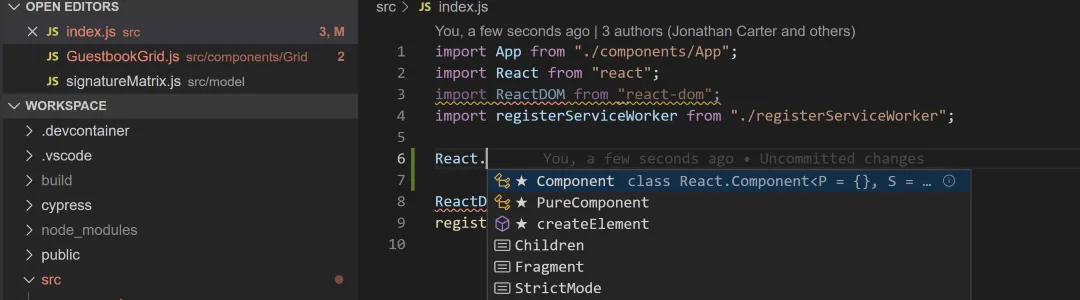
Faster, Smarter Coding With IntelliCode and Refactoring
IntelliCode looks at your code and suggests completions based on patterns learned from thousands of open-source projects, so the suggestions you see are ranked by what actually fits the context — not just alphabetically. Combined with the improved refactoring and navigation tools carried over and refined from Visual Studio 2017, moving through a large codebase takes less time.
Solution loads and builds are also faster in this version, which adds up over a workday. For a developer working in a large enterprise codebase, that’s less time waiting on the IDE and more time writing and reviewing code.
Visual Studio 2019 Enterprise vs. Professional — Why the Difference Matters
Visual Studio 2019 Professional is built for small businesses and self-employed developers. Enterprise adds what larger teams need on top of that: the full test suite, capacity testing, IntelliTrace, and a complete DevOps toolchain for CI/CD pipelines.
If you’re a solo developer or a small team without those requirements, the Visual Studio 2019 Professional Activation Key may be the better fit and the lower cost. Enterprise is worth it once your team needs the collaboration and testing tools this edition adds.
Refined From Visual Studio 2017, Built for Reliability
Visual Studio 2019 keeps the features developers relied on in Visual Studio 2017 and focuses the rest of the update on speed, reliability, and ease of use — an upgraded debugger, better refactoring and navigation, and more efficient builds.
The advanced debugging and diagnostics tools carried over from earlier versions now cover desktop, web, cloud, and mobile applications, so switching between project types doesn’t mean switching debugging tools.
Real-Time Team Collaboration With Live Share
Live Share lets multiple developers edit and debug in the same session at the same time, from their own instance of Visual Studio. It’s built for teams that need to review or pair-program on code without screen-sharing or handing off files.
For distributed or remote teams, that means fewer context switches — a colleague can join your debugging session directly instead of you describing the problem over chat first.
Visual Studio 2019 Enterprise
What is included with your purchase.
Genuine License Key by Email
Your Visual Studio 2019 Enterprise license key is sent to your email, usually within minutes of purchase. There’s no physical media or shipping wait involved.
Lifetime License — Pay Once
This is a one-time purchase, not a subscription. Once activated, the license doesn’t expire and there’s no recurring fee to keep using Visual Studio 2019 Enterprise.
Online Activation in Minutes
Activation happens online, directly inside Visual Studio, right after installation. No phone call is required to get your copy running.
Full Visual Studio 2019 Update Access
Purchasing the full version entitles you to all service and feature updates released for this edition. You’re not locked to the build you installed on day one.
Visual Studio for Mac Included
Your license also covers Visual Studio for Mac, so cross-platform teams aren’t paying for a second product. Install it on either platform as your project needs.
Activation Support Included
If you run into any issue during installation or activation, reach our support team by live chat, WhatsApp, or email. We’ll walk you through it until your copy of Visual Studio 2019 Enterprise is up and running.
Visual Studio 2019 Enterprise installs on a Windows PC, and your license also includes Visual Studio for Mac for teams building across platforms. Purchasing the full version entitles you to all service and functional updates released for this edition.
Visual Studio 2019 Enterprise — Common Questions
Real questions we get from developers and IT teams before they buy.
Is this a one-time purchase or a subscription?
It’s a one-time purchase. You pay once for the Visual Studio 2019 Enterprise license key and it doesn’t expire or renew.
What if activation fails online?
Online activation usually completes automatically inside Visual Studio after installation. If it doesn’t go through, check our FAQ page or contact our support team and we’ll help you get it activated.
Does this include Visual Studio for Mac?
Yes. Your Visual Studio 2019 Enterprise license also covers Visual Studio for Mac, so you can build cross-platform apps without buying a separate product.
How is Enterprise different from Visual Studio 2019 Professional?
Enterprise adds the tools larger teams need on top of Professional — a full DevOps toolchain, capacity testing, IntelliTrace historical debugging, and Code Map. Professional is built for small businesses and solo developers who don’t need that scale.
Want more ?
![Visual Studio 2022 Enterprise Activation Key Activation Key [ Online ]](https://mcakey.com/wp-content/uploads/2025/04/visual-studio-2022-enterprise-key-600x745.webp)
![Visual Studio 2019 Professional Activation Key Activation Key [ Online ]](https://mcakey.com/wp-content/uploads/2025/04/Visual-Studio-2019-Professional-600x745.webp)
![Visual Studio 2022 Professional Activation Key Activation Key [ Online ]](https://mcakey.com/wp-content/uploads/2025/04/Visual-Studio-2022-Professional-1-600x745.webp)
 Visual Studio 2019 Enterprise ...
 $99.99

Myrtie (verified owner) –
The delivery was lightning fast, very satisfied with the product.
Claire (verified owner) –
The fastest and easiest digital download I’ve ever had.
Vivianne (verified owner) –
The product was delivered almost immediately, very happy.
Gennaro (verified owner) –
The download was quick, and the product is exactly what I needed.
Julie (verified owner) –
The fastest delivery I’ve ever experienced, highly recommend.
Tyra (verified owner) –
The product was in my inbox within moments, very happy with my purchase.
Noelia (verified owner) –
The email delivery was super quick, and the product is excellent quality.
Kyla (verified owner) –
The item and the design are very cool. Also the support is amazing, they always help you with any detail that you have.
Ivory (verified owner) –
Fast delivery and excellent quality digital product, very happy with my purchase.
Anissa (verified owner) –
Instant delivery and excellent customer service.
Edmund (verified owner) –
Fast, reliable, and high-quality digital product.
Rebeka (verified owner) –
Amazing digital product, delivered in seconds.
Diego (verified owner) –
The product was delivered almost immediately, very convenient.
Alayna (verified owner) –
Instant access and top-quality digital download, very satisfied.
Lexie (verified owner) –
The product was ready to use within moments, no issues at all.
Xavier (verified owner) –
Quick and easy download, works perfectly.
Virginia (verified owner) –
The product was delivered via email right away, great service.
Hortense (verified owner) –
Quick and easy digital download, very satisfied with the product.
Esperanza (verified owner) –
The fastest digital delivery I’ve experienced, highly recommend.
Chelsie (verified owner) –
The product was delivered via email within moments, very convenient.
Logan (verified owner) –
The email delivery was super quick, and the product is fantastic.
Genoveva (verified owner) –
The product was in my inbox within minutes, very convenient.
Ocie (verified owner) –
The email delivery was lightning fast, highly recommend this store.
Colin (verified owner) –
Excellent digital product, delivered almost instantly.
Kaleb (verified owner) –
The product was in my inbox almost immediately, very happy with my purchase.
Nels (verified owner) –
The product was ready to use within minutes, highly recommend.
Torey (verified owner) –
The product was delivered straight to my inbox, very convenient.
Gabriel (verified owner) –
Fast delivery and great quality, very satisfied.
Lelia (verified owner) –
Fast and smooth download, excellent quality digital product.
Toney (verified owner) –
Fast and reliable digital download, will definitely buy again.
Jennyfer (verified owner) –
I received the download link instantly, very satisfied.
Luz (verified owner) –
I received my digital product almost instantly, very impressed.
Elinore (verified owner) –
The digital download was smooth and super quick.
Porter (verified owner) –
The download was quick and easy, highly recommend this store.
Stanton (verified owner) –
Easy to purchase and download, very convenient.
Abdullah (verified owner) –
It’s far better than those similar products, while the price is still acceptable.
Hilma (verified owner) –
Fast and smooth digital download, very happy with the product.
Chadd (verified owner) –
Fast and reliable email delivery, great quality product.
Stacey (verified owner) –
The download was fast, and the product is excellent quality.
Jonas (verified owner) –
The product was delivered almost instantly, great service.
Stefan (verified owner) –
Received the download link immediately, very impressed.
Connor (verified owner) –
The best place for fast digital downloads, will buy again.
Gerardo (verified owner) –
The product was in my inbox within moments, impressive service.
Frederik (verified owner) –
Wished I had found this sooner, it took me a lot of money and time until I found my dream product here!
Chesley (verified owner) –
The digital product was ready to use immediately, no issues.
Concepcion (verified owner) –
The product was in my inbox right after purchase, so convenient.
Arnold (verified owner) –
Quick and easy download, excellent quality digital product.
Tina (verified owner) –
Quick and easy access to a top-quality digital product.
Donny (verified owner) –
The delivery was lightning fast, and the product is superb.
Fernando (verified owner) –
Immediate download, exactly what I needed.
Alexandria (verified owner) –
The fastest delivery I’ve experienced, fantastic service.
Fritz (verified owner) –
I was able to download the product immediately, fantastic!
Sophia (verified owner) –
Just love the design and the customer support is the nicest.
Kimberly (verified owner) –
The product was delivered right away, fantastic service.
Hester (verified owner) –
The email delivery was super quick, and the product is excellent quality.
Marianne (verified owner) –
Been using a lot of items, this one is obviously the best
Wiley (verified owner) –
Fast, efficient, and high-quality digital product.
Effie (verified owner) –
The product was ready to use within minutes, great service.
Ronaldo (verified owner) –
The download was smooth and quick, very happy with my purchase.
Taya (verified owner) –
I love how fast the download was, perfect for my needs.
Laurie (verified owner) –
The email delivery was super fast, and the product is fantastic.
Richie (verified owner) –
The download link was sent immediately, very satisfied.
Royal (verified owner) –
The product was in my inbox in seconds, highly recommend this store.
Isabell (verified owner) –
Fast delivery and excellent quality digital product.