


No products in the cart.

This product is also available in a bundle Save Money
1 / 3
Office 2021 Professional Plus 1 PC Online Activation
$8.99
+
![Windows 11 Professional Activation Key [ Online ]](https://mcakey.com/wp-content/uploads/2024/07/windows-11-professional-2-150x150.webp)
Windows 11 Professional Activation Key [ Online ]
$139.99
Windows 11 Pro + Office 2021 PRO PLUS - Bundle Offer
$119.99
$148.98 separately
Save 19% View Bundle → Windows 11 Professional Activation Key [ Online ]
$139.99
+
Microsoft Office 2024 Professional Plus Online Activation
$119.99
+
McAfee Internet Security - 5 PCs - 12 Months
$10.99
Windows 11 Pro + Office 2024 Pro Plus + McAfee 12 months
$199.00
$270.97 separately
Save 27% View Bundle → Windows 11 Professional Activation Key [ Online ]
$139.99
+
Visual Studio Professional 2026 Online Activation
$119.99
Windows 11 Professional — The Upgrade Made For Serious Work
Windows 11 Professional is a lifetime license key for Microsoft’s business-grade desktop operating system, delivered by email within minutes of payment. As a Certified Microsoft Partner, MCAKey sells only genuine license keys — this one activates directly through Microsoft’s own servers, no workarounds or third-party tools involved. It’s the edition to buy if you’re running a small business, managing client machines, or working from a personal laptop that still needs BitLocker and Remote Desktop on tap.
Windows 11 Home covers the basics. Windows 11 Pro adds the layer that businesses and power users actually need: full-disk encryption, domain and Azure AD join, a sandboxed environment for testing unfamiliar software, and Group Policy controls for managing more than one machine. These aren’t upsells — they’re the actual reason Pro costs more than Home.
- ActivationOnline Activation
- Devices1 PC
- Platform32-bit & 64-bit
- DeliveryEmail, within minutes
The desktop itself works differently than Windows 10. Snap Layouts arrange open windows into a grid the moment you hover the maximize button. Virtual desktops keep a work project separate from everything else running on the machine. Microsoft Teams sits in the taskbar as a system feature, not an app you have to launch separately.
For anyone managing more than their own machine, Windows 11 Professional is the edition that makes it possible. Group Policy lets an admin configure and lock down settings from one place. Azure AD join ties a device into a company’s existing identity setup instead of treating it as a standalone PC. None of this exists in Windows 11 Home.
What Is Included in Windows 11 Professional
Everything in Windows 11 Home, plus the business and security tools this edition is built around.
BitLocker Encryption
BitLocker encrypts the entire drive, so a lost or stolen laptop hands over nothing but scrambled data. BitLocker To Go extends the same protection to USB drives, useful if client files ever leave the office on a flash drive.
Remote Desktop
Connect to your work PC’s full desktop — apps, files, open windows — from another device over the internet. It’s the feature IT teams and remote workers reach for most, and it isn’t in Windows 11 Home at all.
Azure AD & Domain Join
Join the machine to a company domain or Azure Active Directory instead of running it as a standalone PC. Single sign-on and centralized account management come with it, no extra software required.
Windows Sandbox
Windows Sandbox opens a throwaway copy of Windows for testing an installer or file you don’t fully trust. Close it and everything inside is gone — your actual system was never touched.
Windows Hello
Face or fingerprint recognition signs you in faster than typing a password, with a PIN as the fallback. It works with the camera and sensors already built into most modern laptops.
Snap Layouts & Virtual Desktops
Hover the maximize button and pick a grid layout to arrange open windows in one move. Virtual desktops keep a separate set of windows for each project, so nothing from one task bleeds into another.
Secure Boot & TPM 2.0
Secure Boot and TPM 2.0 check that nothing has tampered with the system before Windows even starts loading. It closes off the kind of firmware-level attack that antivirus software can’t see.
Group Policy Management
Group Policy lets one administrator configure settings — password rules, installed software, network access — across every machine in an office from a single console. It’s the tool that keeps IT support requests from piling up.
Windows 11 Professional vs Home — Where the Extra Cost Goes
Home covers casual use. Professional is for people who need control over their own machine.
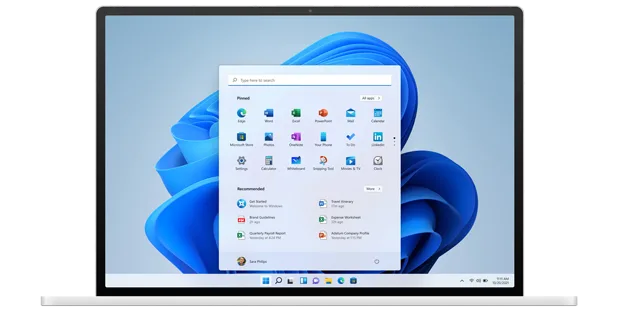
Multitasking That Doesn’t Fall Apart Under Load
Snap Layouts change how you actually move between windows during a work day. Hover the maximize button on any window, pick a grid, and the rest snap into place around it. Combine that with Virtual Desktops and you can keep a client project, your email, and a personal browser session fully separated without minimizing anything.
None of this needs extra software. It’s built into the shell, so it works the same whether you’re on a laptop screen or a triple-monitor desktop setup.
![Windows 11 Professional Activation Key [ Online ]](https://mcakey.com/wp-content/uploads/2026/07/win11_1.webp)
Security Set Up by Default, Not Bolted On
BitLocker encrypts the whole drive the moment it’s turned on — pull the SSD out of the laptop and the data on it is unreadable without the recovery key. Windows Hello gets you logged in with a glance or a fingerprint in under two seconds, and Windows Defender runs in the background without noticeably slowing the machine down.
Secure Boot and TPM 2.0 verify the system hasn’t been tampered with before the OS even loads, so malware can’t plant itself at the firmware level. On Home, several of these protections are missing entirely; on Professional, they’re on by default.
![Windows 11 Professional Activation Key [ Online ]](https://mcakey.com/wp-content/uploads/2026/07/win11_2.webp)
Remote Desktop Means Your Office PC Travels With You
Remote Desktop is one of the clearest reasons to pay for Professional over Home — Home doesn’t include it at all. Connect from a laptop, a tablet, or another PC and you get the exact desktop you left behind: open apps, saved files, current settings.
For IT support, it means fixing a problem without being at the machine. For a small business owner, it means the office PC is reachable from anywhere with an internet connection.
![Windows 11 Professional Activation Key [ Online ]](https://mcakey.com/wp-content/uploads/2026/07/win11_4.webp)
Built to Work Alongside Microsoft 365
Teams is built into the taskbar itself, not a separate app you open and close. Start a call, send a message, or share your screen without switching windows. It’s tied into Outlook and Calendar too, so a scheduled meeting shows up where you’d expect it.
If your business already runs on Microsoft 365, or you’re pairing this with something like Office 2021 Professional Plus, Windows 11 Professional is the edition that was actually designed around that setup.
Microsoft Windows 11 Professional
What is included with your purchase.
Genuine License Key by Email
Your Windows 11 Professional key lands in your inbox within minutes of payment going through. No physical box, no shipping wait, no disc to lose.
Lifetime License — Pay Once
This is a perpetual license, not a subscription. Pay once and the key is yours — no renewal fee, no expiry date, no annual charge showing up later.
Online Activation in Minutes
Enter the key during setup or from Settings afterward, and Windows activates directly against Microsoft’s servers. On a normal internet connection, the whole process takes a few minutes.
Full Windows Update Access
An activated copy of Windows 11 Professional receives every standard Microsoft update — security patches, feature updates, driver fixes — the same as a retail installation.
32-bit and 64-bit Supported
The key activates either installer. Almost every current PC should run the 64-bit build; the 32-bit installer stays available for older or lower-spec hardware.
Activation Support Included
If activation doesn’t go through on the first try, our support team is reachable by live chat, WhatsApp, and email — most issues get sorted in a single message.
Windows 11 Professional requires a processor running at 1 GHz or faster with at least two cores on a compatible 64-bit processor or SoC, 4 GB RAM, 64 GB storage, a DirectX 12-compatible GPU with WDDM 2.0 drivers, a 720p display at 9 inches or larger, UEFI firmware with Secure Boot, and TPM version 2.0.
Windows 11 Professional — Common Questions
What buyers usually ask before purchasing a key.
Does this license expire or renew?
No. This is a one-time purchase — a lifetime license key with no subscription, renewal fee, or expiry date attached to it.
What happens if my key doesn’t activate?
Reach out through live chat, WhatsApp, or email and our support team will walk you through it — most activation issues are resolved in one message, and it’s covered as part of your purchase.
Will this work on my PC?
Yes, as long as the hardware meets Microsoft’s Windows 11 requirements — a 64-bit compatible processor, 4 GB RAM, 64 GB storage, and a TPM 2.0 chip. Most PCs built in the last four to five years meet this out of the box.
Can I use this key to upgrade from Windows 10?
Yes. Install it as an upgrade over an existing Windows 10 installation and your files, apps, and settings carry over — or use it for a fresh installation on a new drive.
Want more ?
![Windows 10 Professional Activation Key [ Online ]](https://mcakey.com/wp-content/uploads/2024/07/Windows-10-Professional-Activation-key-600x745.webp)
![Windows 11 Home Activation Key [ Online ]](https://mcakey.com/wp-content/uploads/2025/04/windows-11-home-2-600x745.webp)

 Windows 11 Professional Activ...
 $139.99

Daron (verified owner) –
The fastest digital download I’ve ever experienced, very satisfied.
Anastasia (verified owner) –
Immediate delivery, and the product is exactly what I needed.
Antoinette (verified owner) –
I received the product instantly, great service.
Gilberto (verified owner) –
The product was delivered via email right away, great service.
Earnest (verified owner) –
The product was in my inbox within minutes, very convenient.
Elody (verified owner) –
Super fast email delivery, just what I needed.
Markus (verified owner) –
The email delivery was lightning fast, highly recommend this store.
Vergie (verified owner) –
The email delivery was super quick, and the product is fantastic.
Madyson (verified owner) –
Quick and easy access to a high-quality digital product, highly recommend.
Tianna (verified owner) –
The product was ready to use within moments, very convenient.
Kory (verified owner) –
The first time I got the urges to leave a comment, but this is simply a top-notch thing you can find.
Katrina (verified owner) –
The product was in my inbox within seconds, very satisfied.
Priscilla (verified owner) –
The fastest delivery I’ve ever experienced, highly recommend.
Ceasar (verified owner) –
Fast and smooth download, excellent quality digital product.
Hillary (verified owner) –
I got excellent support for this item. They were patient with me, and helped me solve my issue. I recommend this company 100%
Jace (verified owner) –
The fastest digital download I’ve ever experienced, great service.
Lisette (verified owner) –
The product was ready to use immediately, no issues at all.
Kadin (verified owner) –
The product was delivered almost instantly, great service.
Justina (verified owner) –
Been using a lot of items, this one is obviously the best
Gia (verified owner) –
The product was in my inbox within moments, very happy with my purchase.
Shyann (verified owner) –
The email delivery was super quick, and the product is excellent quality.
Kyler (verified owner) –
The item and the design are very cool. Also the support is amazing, they always help you with any detail that you have.
Assunta (verified owner) –
The product was in my inbox almost immediately, very happy with my purchase.
Stanton (verified owner) –
Good response from the support.
Bertrand (verified owner) –
The download was quick, and the product is exactly what I needed.
Andreane (verified owner) –
The fastest and easiest digital download I’ve ever had.
Heber (verified owner) –
The email delivery was super fast, and the product is excellent quality.
Freda (verified owner) –
Just love the design and the customer support is the nicest.
Yesenia (verified owner) –
Fast and reliable digital download, will definitely buy again.
Samson (verified owner) –
Couldn’t believe how quickly I received my download!
Breanne (verified owner) –
Thank you guys for this amazing creation! Absolutely mind-blowing!
Abigayle (verified owner) –
Quick and easy download, excellent quality digital product.
Humberto (verified owner) –
The download was quick and easy, highly recommend this store.
Leilani (verified owner) –
This digital product is amazing, exactly what I needed.
Francis (verified owner) –
The product was delivered straight to my inbox, very convenient.
Vincent (verified owner) –
The download link was sent immediately, very happy with my purchase.
Marcia (verified owner) –
The email delivery was lightning fast, great product.
Kayden (verified owner) –
Quick and easy download, works perfectly.
Rhett (verified owner) –
I appreciate the instant access to this amazing product.
Preston (verified owner) –
The best digital download experience I’ve had so far.
Anissa (verified owner) –
I received my digital product almost instantly, very impressed.
Maryam (verified owner) –
The product was delivered right away, very happy with my purchase.
Colt (verified owner) –
Instant access and top-quality digital download, very satisfied.
Garnett (verified owner) –
The product was ready to use almost instantly, highly recommend.
Elsa (verified owner) –
The fastest digital download I’ve ever had, very satisfied.
Jaron (verified owner) –
The product was delivered to my inbox within minutes, so impressed!
Carolyne (verified owner) –
The product was delivered to my inbox in no time, great service.
Jakayla (verified owner) –
Instant access and top-quality digital download, highly recommend.
Earl (verified owner) –
Fast, reliable, and high-quality digital product.
Adrianna (verified owner) –
Been using it for a while, I usually don’t write a review but this time I am truly convinced to write.
Gladyce (verified owner) –
Instant access to a fantastic digital product, highly recommend.
Taryn (verified owner) –
The product was delivered almost immediately, very happy.
Freddy (verified owner) –
The download was fast, and the product is excellent quality.
Cordelia (verified owner) –
The product was ready to use within minutes, highly recommend.
Lucy (verified owner) –
This is the coolest thing I’ve found on here! Will keep using your products in the future!
Lucius (verified owner) –
Fast and reliable email delivery, very happy with my purchase.
Antwan (verified owner) –
Received my digital download instantly, fantastic service!
Royce (verified owner) –
I received the download link immediately, very satisfied.
Dessie (verified owner) –
Fast delivery and excellent quality digital product, very happy with my purchase.
Kari (verified owner) –
The digital product was exactly as described, quick download.
Jayden (verified owner) –
I appreciate the fast delivery and high-quality product.
Haven (verified owner) –
Instant access to a high-quality digital product, very happy.
Korey (verified owner) –
I rarely leave a comment, but this item is beyond worth it! Gotta let you guys know!
Missouri (verified owner) –
The email delivery was super fast, and the product is excellent.
Felipa (verified owner) –
The product was in my inbox within moments, impressive service.
Nicolette (verified owner) –
Wished I had found this sooner, it took me a lot of money and time until I found my dream product here!
Idella (verified owner) –
The product was delivered almost immediately, very convenient.
Katelin (verified owner) –
Quite easy to use, nice design, surely will buy again
Emerald (verified owner) –
Excellent product and fast email delivery.
Myrtle (verified owner) –
Fantastic product with a super quick download.
Emmett (verified owner) –
The product was in my inbox right after purchase, so convenient.
Lavonne (verified owner) –
The digital download was smooth and hassle-free.
Corrine (verified owner) –
Fast, efficient, and high-quality digital product.
Tommie (verified owner) –
Quick and easy access to a top-quality digital product, highly recommend.
Frank (verified owner) –
The best place for fast digital downloads, will buy again.
Lew (verified owner) –
Fast delivery and excellent quality digital product.
Eladio (verified owner) –
Instant download, no issues at all.
Zachariah (verified owner) –
Easy to purchase and download, very convenient.
Rodrigo (verified owner) –
I received the download link instantly, very satisfied.
Isabell (verified owner) –
Amazing digital product, delivered in seconds.
Elian (verified owner) –
The product was ready to use within moments, no issues at all.
Oswald (verified owner) –
The product was delivered right away, fantastic service.
Cleta (verified owner) –
The delivery was lightning fast, very satisfied with the product.
Leora (verified owner) –
Instant access and top-quality product, very satisfied.
Breanna (verified owner) –
The fastest delivery I’ve experienced, highly recommend.
Celine (verified owner) –
The fastest delivery I’ve experienced, fantastic service.
Adell (verified owner) –
Think everyone should know about this, it’s just beyond my expectations
Jennie (verified owner) –
I received a personalized and attentive treatment. Thanks to this deal, I was able to find a solution to my problem in a short time. 🙂
Jamey (verified owner) –
Great item! It provides too many things compared to its price charged.
Berta (verified owner) –
The delivery was lightning fast, and the product is superb.